
UI Languages
Can I configure the Tourplan NX UI Language?
Yes, the Tourplan NX user interface (UI) can be configured to suit the language needs of individual organisations. Multi language UI functionality allows users to select an alternative language to navigate Tourplan NX from 7 UI language options.
This article explains…
-
What UI languages are available?
-
The required setting to implement UI Language variations.
Overview
Tourplan provides 7 UI Language options; English, Chinese, Dutch, Spanish, French, Italian and Japanese. Organisations can enable one or all language options depending on the language needs of their users. Once UI language alternatives are enabled individual users can select their preferred language.
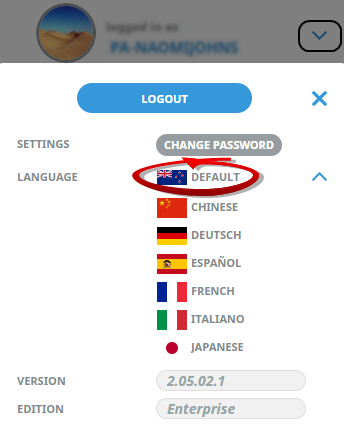
Enabling Additional UI Languages
System Wide - INI Settings
To allow alternative UI language options, the required language(s) must first be enabled within Code Setup > INI Settings > System.
Insert the Setting Name LANGUAGES and enter the required language (2-character code). If more than one UI language is required; enter the language codes using a comma-separated list.
For example, ES, FR, and IT would allow users to select a Spanish, French, or Italian language UI.
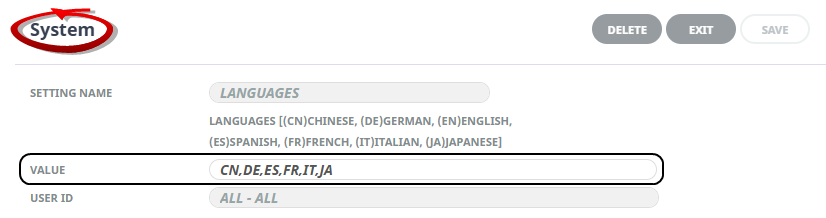
The available languages are:
-
(CN) Chinese
-
(DE) German
-
(EN) English
-
(ES) Spanish
-
(FR) French
-
(IT) Italian
-
(JA) Japanese
NOTE: The INI Settings application is available for users with sufficient system permissions within Tourplan NX and should be done in consultation with a Tourplan system administrator.