Understanding Supplier Confirmation Functionality
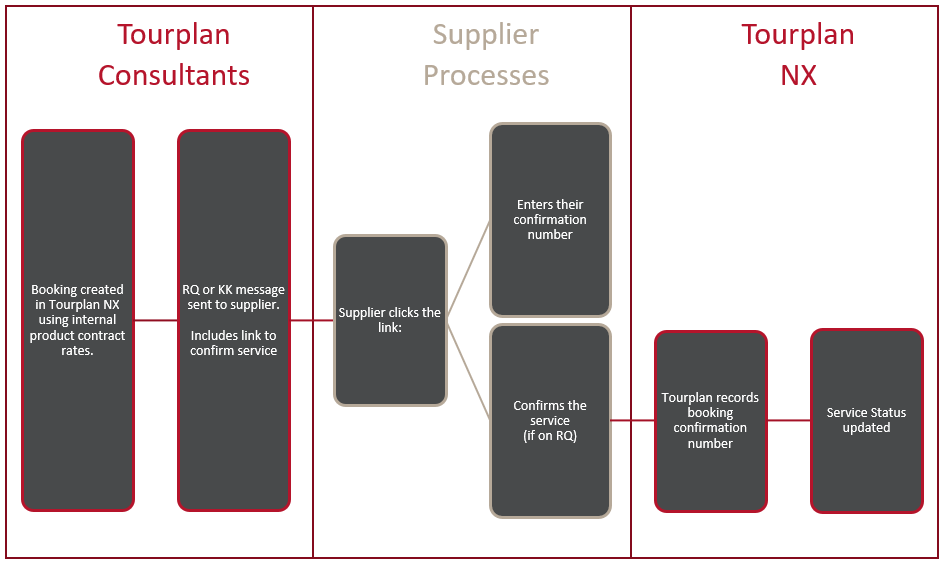
Tourplan customers can offer their suppliers access to a standalone web application giving them the ability to:
-
Confirm services.
-
Provide a confirmation number.
NOTE: This is done via a link provided in the supplier confirmation message.
Key Benefit
Organisations using the supplier confirmation option are able to provide a streamlined confirmation process for their suppliers, whilst minimising manual touch points for their own bookings.
How do I set up supplier confirmations?
You will need to enable a supplier confirmation webpage and update the supplier confirmation message. Your organisation will be required to:
-
Specify a Supplier Confirmation Application – To provide suppliers with a booking confirmation webpage a URL must be specified within INI Settings. See your local Tourplan support office for more information.
-
Update the Supplier Confirmation message – A substitution code <TOKEN:SC:alternative text> within the supplier confirmation message is required to link to the supplier confirmation webpage.
NOTE: The link provided in the supplier confirmation message is only valid for 7 days or 1-time use. After this, another supplier confirmation message is required to generate a new link to the booking confirmation webpage.
Supplier Receives
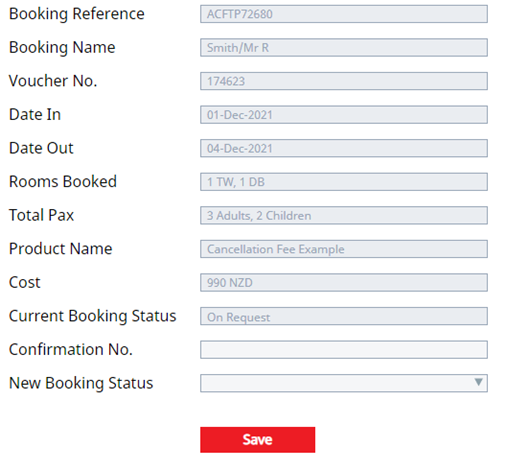
When the link is used the email the supplier will be presented with a screen that allows them to enter their confirmation number, set the status and save.