
The Debtor Balances screen is accessed via menu Debtors > Accounting > Balances. Values on this screen show outstanding debtor balances by the age of the balance.
Debtor Balances Screen
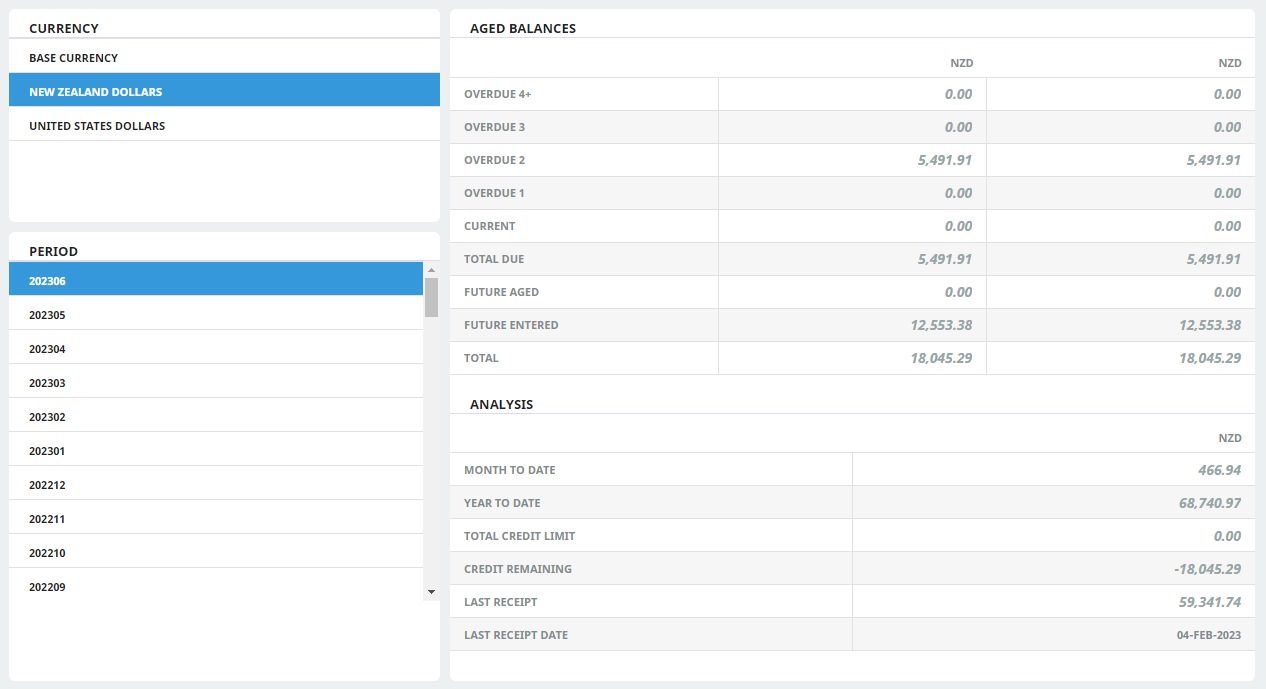
NOTE: In the Aged Balances section, balances are shown as NZD in both columns because New Zealand Dollars is selected in the Currency section. If United States Dollars was selected in the Currency section, Aged Balances would show USD in the left hand column and Base Currency (NZD) in the right hand column.
When a debtor has multiple currencies attached, initial entry to this screen is the "Base Currency" display. The Base Currency is the final accounting currency of the system.
About the Debtor Balances Screen
This screen comprises four sections:
Currency Section
This section lists the currencies which are attached to the
Period Section
This shows the current
Aged Balances Section
This section displays the balances by age.
The Ageing is broken down into seven periods:
- Overdue 4+: The total value of all transactions in the selected currency whose age periods are 4 periods or more older than the current accounting period.
- Overdue 3: The total value of all transactions in the selected currency whose age periods are 3 periods older than the current accounting period.
- Overdue 2: The total value of all transactions in the selected currency whose age periods are 2 periods older than the current accounting period.
- Overdue 1: The total value of all transactions in the selected currency whose age periods are 1 period older than the current accounting period.
- Current: The total value of all transactions in the selected currency whose age periods are the same as the current accounting period.
- Total Due: The total in the selected currency of Overdue 4+ through to Current Period fields.
- Future Aged: The total value of all transactions in the selected currency whose age periods are in advance of the current accounting period.
- Future Entered: The total value of all transactions in the selected currency whose transaction date is in advance of the current period ending date.
- Total: The Total Due value, including the Future Aged and Future Entered values in the selected currency.
Analysis Section
The Analysis panel will not display until a currency other than Base Currency has been selected.
The Analysis section is broken down into
- Month-to-Date: Total revenue for the agent in the selected currency for the current period month.
- Year-to-Date: Total revenue for the agent in the selected currency for the current financial year.
- Total Credit Limit: The value of any credit limit set against this currency in the Debtors application Currency tab.
- Credit Remaining: The credit limit value remaining. This is calculated as Credit Limit minus Total Balance Due.
NOTE: If a debtor does not have a credit limit set, the Credit Remaining field will display a negative amount. If the debtor has a credit balance total and no credit limit set, the Credit Remaining will display as a positive amount.
- Last Receipt: The value of the last receipt posted in the selected currency.
- Last Receipt Date: The date of the last receipt in the selected currency.