Tourplan
General InformationProductsServicesResources
myTourplan
Home / Resources / User Manuals / FITs User Manual / Operations and Accounts / Operations and Accounts Menu

Topics

  • NX Version 2.5 Home
  • ▶Getting Started With Tourplan NX
  • ▼FITs User Manual
    • ▶Getting Started with FITs
    • ▶Creating FIT Quotes
    • ▶Managing Existing FIT Bookings
    • ▶Booking Details
    • ▶Itinerary Menu
    • ▼Operations and Accounts
      • Operations and Accounts Menu
      • Accounts Summary
      • Creating Invoices
      • Tour Window
      • Documentation
      • Agent Message Generation
      • Supplier Message Generation
      • Bulk Copy
      • FIT Queue Entries
      • Contacts
      • Change History
    • ▶Supporting Information
  • ▶Groups User Manual
  • ▶PCM Quotes User Manual
  • ▶Accounts User Manual
  • ▶Reports User Manual
  • ▶Product User Manual
  • ▶PCM Packages User Manual
  • ▶Operations User Manual
  • ▶System Setup User Manual
  • ▶Messaging User Manual
  • ▶About the User Manuals

Operations and Accounts Menu

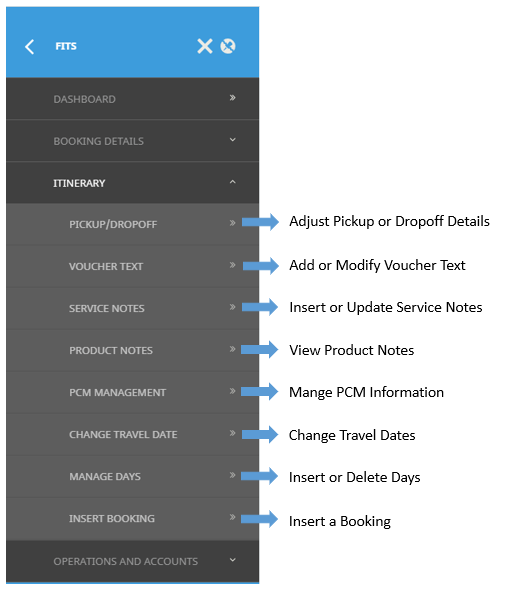
As with changing general booking details or itinerary information, there are several menu options, depending on the type of change needed.

The following graphic shows the FITs Operations and Accounts menu matched with corresponding procedures in the FITs User Manual.

 

myTourplan

Your centralised hub for Tourplan resources, product information, support, and training materials. Powered by the world's leading tour operator software since 1986.

Products
Tourplan NXOnline DistributionSupplier ConnectivityaccountConnectTourplan Cloud
Services & Support
SupportTrainingSystem UpgradesAudits
Resources
Release NotesUser ManualsKnowledgebaseNewsletter
© 2026 Tourplan. All rights reserved. | Privacy Policy | Terms & ConditionsTrusted by 450+ tour operators in 75 countries | Powered by Tourplan