
Loading interactive content…
PCM Quotes can be 'duplicated' to create multiple new sPCM Quotes with updated
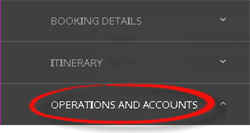
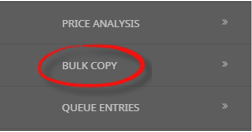
Locate and open the original PCM Quotes you wish to copy, then choose Bulk Copy from the Operations and Accounts menu.
Within the Bulk Copy screen, you can enter new
All details from the original
Copy PCM
- Search for and retrieve a PCM to work with. If you haven't done this already, see Retrieve an Existing PCM.
-
Select menu
 PCM Quotes > Operations and Accounts > Bulk Copy.
- Click the PCM Quotes menu to expand it:

- Click the Operations and Accounts menu option to expand it:

- Click Bulk Copy to view Bulk Copy Booking screen:

- Click the PCM Quotes menu to expand it:
-
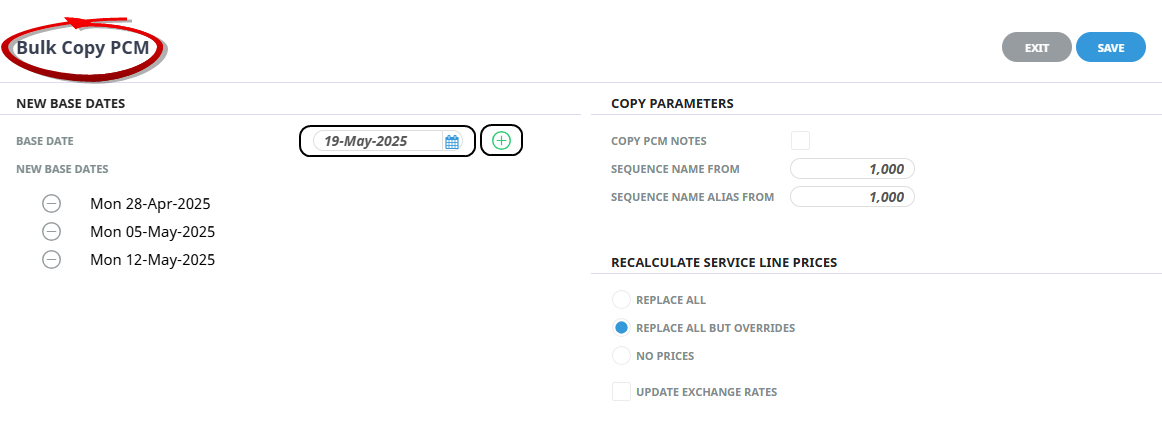
On theBulk Copy PCM screen, add new Base Dates using the calendar selection, or manually entering a date, then select + to continue adding Base Dates.
-
Complete theCopy Parameters: To copy notes from the source PCM tick the Copy PCM Notes check box.
NOTE: The Sequence Name From, and Sequence Name Alias From fields default to a value of 1,000. If a different sequence number is required you can update to a preferred number.
-
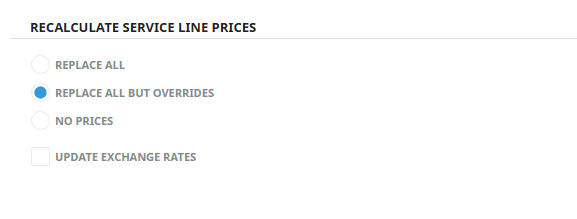
Select a method toRecalculate Service Line Prices. Click to learn more.
-
ClickSave to keep the changes.

-
ClickExit to discard any changes.

- To view copied PCMs, use the PCM search feature. The newly created PCMs will have a sequence number appended to the booking name. See Retrieve an Existing PCM.

About the Bulk Copy PCM Fields
New Base Dates
Base Date
Enter or select a base date from the calendar selection, the green plus button is used to form a list of 'New Base Dates' below.
New Base Dates
Each Base Date listed will create a new PCM in the Bulk Copy process, and the services will update in the PCM to match the New Base Date.
Copy Parameters
Copy PCM Notes
All PCM notes will be copied to the new PCM if the checkbox is selected.
Sequence Name From
When a new PCM is created from the copied PCM in a bulk copy process, all PCM details are copied including the PCM Name. This numerical setting is appended to the copied PCM, and when multiple PCMs are created the number will append sequentially starting with the value inserted here.
NOTE: If a PCM Name and sequence number already exist for a PCM, the system assigns the next available sequence number.
Sequence Name Alias From
When a new PCM is created from the copied PCM in a bulk copy process, all PCM details are copied including the PCM Alias Name. This numerical setting is appended to the copied PCM, and when multiple PCMs are created the number will append sequentially starting with the value inserted here.
NOTE: If a PCM Name Alias and sequence number already exist for a PCM, the system assigns the next available sequence number.
Recalculate Service Line Prices
Replace All - Revisits the Tourplan Product Database and re-costs all services.
All Except Overrides - Revisits the Tourplan Product Database, however does not re-cost services where the original product rates were manually overridden. Manually overridden values to be confirmed with the OK Button.
No Prices - Recalculates the totals based on the existing service line values.
Updating Exchange Rates - When the PCM services are re-costed should Tourplan continue to use the previous exchange rates (unchecked) or use the exchange rates from the Tourplan Code Setup Module.