
Change history for individual transaction activities performed within Tourplan NX can be viewed. This can be seen via the audit view available at the transaction level. Change history shows what (if anything) was changed, the date and time the change was made, and who made the change.
When in use within Tourplan NX, a Change History tab will be visible during the following processes:
-
Debtor Transaction Audit.
-
Creditor Transaction Audit.
-
General Ledger Transaction Audit.
About Change History Tab
General Ledger Transaction Audit
The process is actioned as normal until the Transaction Audit Screen (see General Ledger Transaction Audit ). At which point an additional Change History tab will be available. Within this tab key information about the transaction history will be displayed.
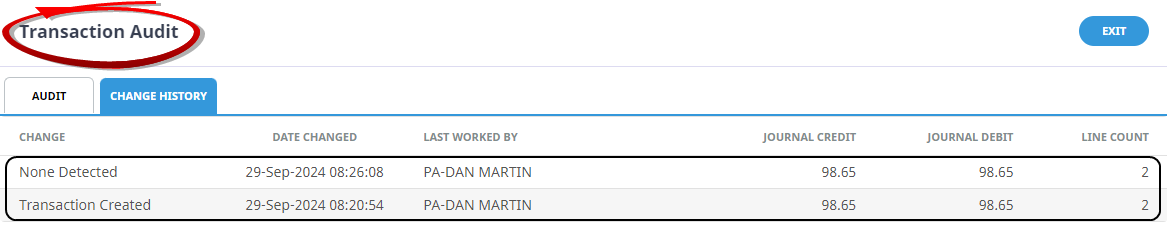
General Ledger Transaction Audit
Depending on the type of transaction being audited, Debtor, Creditor or Journal, the columns in the change history tab will differ. The columns for Debtors and Creditors have been covered in Debtor Transaction Change History and Creditor Transaction Change History.
Change
The type of change that was made to the invoice during the recorded activity - see the Change Types definitions table below for a full list.
Date Changed
The date and time of the recorded change activity.
Last Worked By
The name of the user who performed the change activity.
Journal Credit
The total credit value of the journal at the time the change activity was saved.
Journal Debit
The total debit value of the journal at the time the change activity was saved.
Line Count
The total number of transaction lines in the journal at the time the change activity was saved.
NOTE: Other columns available are Last Worked Date, and Total Lines. Refer to Change Default Column Headings for information on changing column headings.
Change Types
| Change | Definition |
|---|---|
| Transaction Created | Details of the transaction when it was first created. |
| Lines Added | Transaction Lines were added. |
| Lines Removed | Transaction Lines were removed. |
| Value Increased | The 'Value' amount has increased. |
| Value Decreased | The 'Value' amount has decreased. |
| Tax Increased | The 'Tax' value has increased. |
| Tax Decreased | The 'Tax' value has decreased. |
| Commission Increased | The 'Commission' value has increased. |
| Commission Decreased | The 'Commission' value has decreased. |
| Commission Tax Increased | The 'Commission Tax' value has increased. |
| Commission Tax Decreased | The 'Commission Tax' value has decreased. |
| Journal Credit Increased | The 'Journal Credit' value has increased. |
| Journal Credit Decreased | The 'Journal Credit' value has decreased. |
| Journal Debit Increased | The 'Journal Debit' value has increased. |
| Journal Debit Decreased | The 'Journal Debit' value has decreased. |
| Cash Allocated | Cash has been allocated. |
| None Detected | A 'Save' was performed but no change to the invoice values was made, e.g. a description was updated. |
| TRL Lines Added | A TRL has been added e.g. commission or tax. |
| TRL Lines Removed | A TRL has been removed e.g. commission or tax. |
| Futures Changed | A date has changed on a transaction, e.g. The booking date for an AP Invoice line has been change to a different accounting period. |