
Loading interactive content…
The General Ledger Trial Balance report lists debit, credit and balance totals for specified General Ledger accounts for a final period.
This report includes totals for selected periods, year to date and future periods. Or it can be run as a detailed Trial Balance.
When the report is output to View, PDF or CSV file the information available within the generated report is the:
- Period.
- Currency.
- Branch.
- Department.
- Account.
- Description.
- Debit.
- Credit.
- Balance.
- YTD Debit.
- YTD Credit.
- YTD Balance.
- Future Debit.
- Future Credit.
- Future Balance.
NOTE: Data can be ordered by specific options, and order by settings are selected within the Other Tab.
The report can be generated with the following parameters:
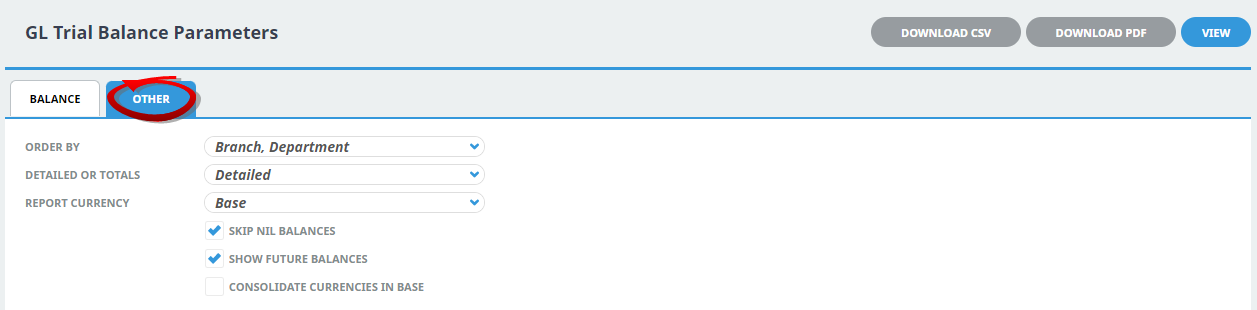
- Order By - Dropdown (Branch, Department and Account).
- Show Detailed or Totals - Dropdown (Detailed default).
- Report Currency - Dropdown (Base, Branch or Foreign Currency).
- Skip Nil Balances (Yes or No).
- Show Future Balances (Yes or No).
- Consolidate Currencies in Base Currency (Yes or No).
Generating a General Ledger Trial Balance
-
From the Home menu, select
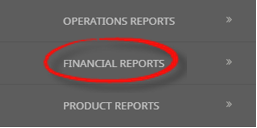
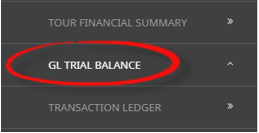
 Home > Reports > Financial Reports > GL Trial Balance.
- Click the Reports menu to expand it:

- Click the Financial Reports menu option to expand it:

- Click GL Trial Balance to go to the GL Trial Balance parameters screen:

- Click the Reports menu to expand it:
-
On the blank GL Trial Balance Parameters screen, the Balance Tab will open. Select the required parameters for the GL Trial Balance Report.
- Check the completed screens.
- Click on the Other Tab. Select how the results are to be ordered and filtered in the report from the dropdown selections or checkboxes available.
- Select how the report is to be displayed.
-
To view the report, clickView.

-
To Download the report to a PDF file, clickDownload PDF.

-
To Download the report to a CSV file, clickDownload CSV.


About GL Trail Balance Parameters
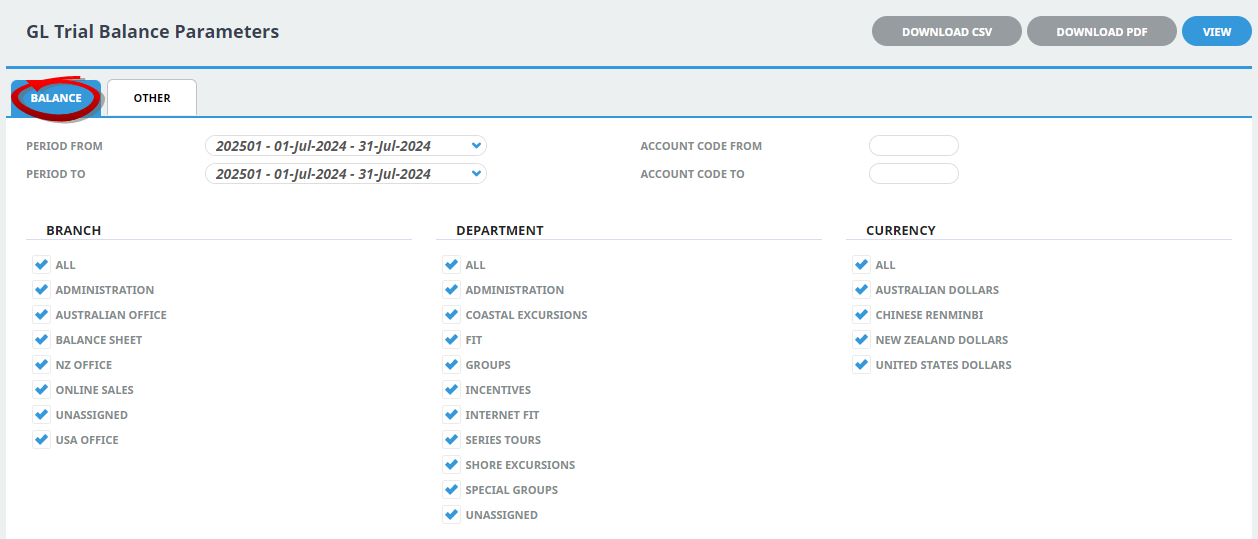
Period From/To
General Ledger Financial Period Range.
Account Code From/To
Transaction General Ledger Account (or range of) - Type the full and correct account code(s).
Branch
Multi select options for available (Transaction GL) branches.
Department
Multi select options for available (Transaction GL) departments.
Currency
Multi select options for available (GL Transaction) currency.
Order By
GL Trial Balance Parameters allow the two order by options:
- Branch, Department (system default).
- Account.
Detailed or Totals
Selection of detailed or totals only.
Report Currency
Selection of Base, Branch or Foreign currencies can be selected (Defaults to Base).
Skip Nil Balances
Checkbox to skip GL Accounts with nil balances (default is checked).
Show Future Balances
Checkbox to show future balances (Debit, Credit, Balance) (default is checked).
Consolidate Currencies in Base
Checkbox to consolidate currencies in base currency. (Default un-checked).