
Transaction Change History Explained
What is the Transaction Change History and how do I enable it?
You can view a complete record of transaction amendment activity within Tourplan. A change history optional feature can be turned on for your organisation.
This article will explain...
-
How transaction change history works
-
How to enable the transaction change history.
Overview
Once enabled, the Change History provides a detailed view of what changed, when the change occurred, and who made it.
Where the Change History Tab Appears
The Change History tab becomes visible during the following transaction audit processes:
-
Debtor Transaction Audit
-
Creditor Transaction Audit
-
General Ledger Transaction Audit
Whenever a transaction audit is performed, the Change History tab displays key details about any changes to the transaction.
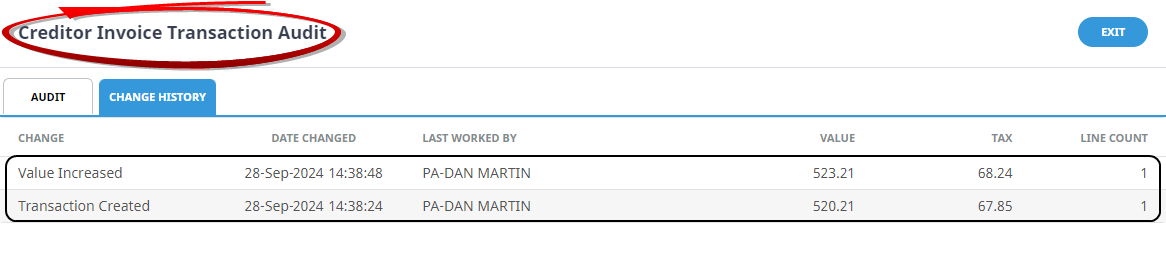
What the Change History Shows
The Change History tab provides:
-
The specific details of what was changed (if anything)
-
The date and time of each change
-
The user who made the change
Enabling the Change History feature does not retroactively record past changes. Only changes made after the feature is activated will be tracked.
Because recording every change can significantly increase data storage requirements, it is recommended to discuss implementation with your local support office before enabling the feature.
Enable Transaction Change History
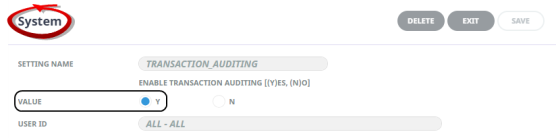
To view the Change History tab and begin recording transaction amendments. The TRANSACTION_AUDITING system setting must be enabled.
-
Open the System Menu > Code Setup > INI Settings > System
-
Click Insert, and enter 'TRANSACTION_AUDITING' Setting Name.
-
Select the 'Yes' radio button which configures this feature for 'All' users.
NOTE: The INI Setting application is available to users with sufficient system permissions within Tourplan. Configuration should be done in consultation with a Tourplan system administrator
For more information on this topic see Creditor Transaction Change History, Debtor Transaction Change History, GL Transaction Change History.