
Loading interactive content…
Tax Applies To
How do I load tax on an option that does not have tax on all components?
By default tax is applied to all components of a service when it is attached at the product database rate level. This means every component included in the product is treated as taxable.
To selectively apply tax to specific components follow the steps below.
Removing Tax From Components of a Product
- Search for the Product.
- Open the Rates menu.
-
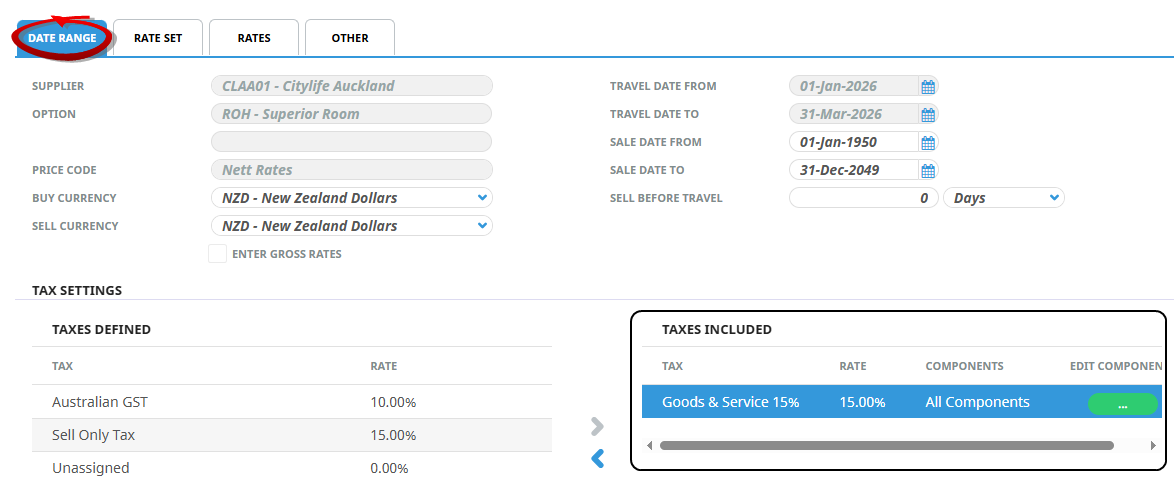
Attach the Tax code to the Product in the
 Date Range tab.
-
After the Tax is attached, click theEdit Components tax button in the Tax Included window.

-
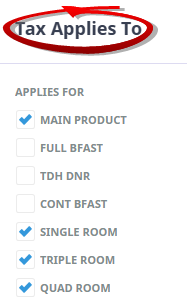
Select/Deselect components as required on theTax Allies To modal.
-
ClickOK to keep the changes and save or update the entry.

-
ClickSave to keep the changes.

For more information on applying Tax to your product, click Tax Settings