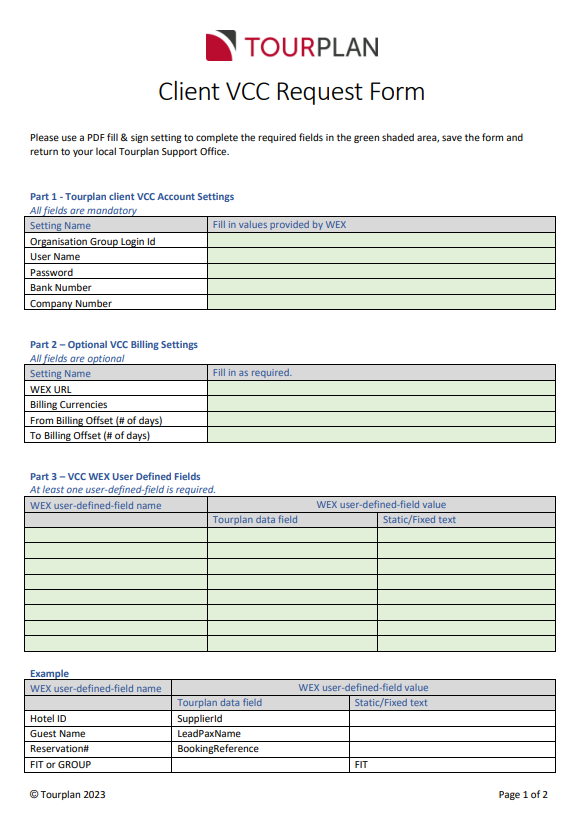
Understanding the Client VCC Request Form
Both external suppliers and internally contracted rates can be paid using Virtual Credit Cards (VCC). These processes, through different, require the submission of a completed Client VCC Request Form.
NOTE: Your Tourplan support office will provide you with a Client VCC Request Form to complete.
The information required includes:
-
Your Account Details – These are mandatory credentials issued by the third party VCC Provider (WEX).
-
Optional VCC Billing Settings.
-
Billing Currency - For each purchase and payment via VCC, there is a Cost Currency and a Billing Currency with the transaction amount.
-
The cost currency is the currency associated with the cost of the product to be paid by the purchaser and is always the service cost currency.
-
The billing Currency is the currency you instruct WEX to bill you in. This is an optional setting, and if not configured, the Billing Currency Value will default to the cost currency.
-
-
Billing Offset (From-To) - You can define the period that a VCC is valid for. These settings control how many days before and after the service date the VCC is valid for. If no value is set, then WEX will determine the default active period.
-
-
WEX User Defined Fields – You must define at least 1 User Defined Field. There is a maximum of 15 fields that can be used to pass additional information for each VCC payment. You are required to list the name of the field(s) and the Tourplan Data Field you require Tourplan to pass to WEX.