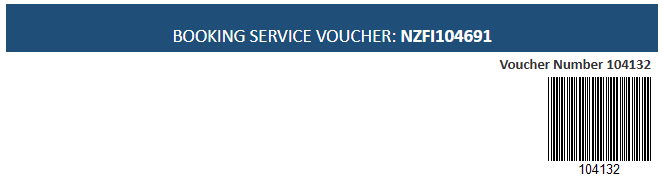
Tourplan NX can generate bar codes from Tourplan data. Bar code Start and End tags allow a code to display on generated messages. These Bar codes can be used to direct customers to bank account numbers, booking reference numbers, voucher numbers or any numerical number.
They formats currently supported in messaging are PDF417 and Code 39 formats - these are ideal for scanning vouchers or tickets.
Example 1: To create a Barcode for a voucher number
<<BARCODE:START>><VN><<BARCODE:END>>
Example 2: To create a Barcode code pointing to the Agent Bank Account
<<BARCODE:START>><AGA><<BARCODE:END>>
The bar code tags work in conjunction with the substitution code or hard coded text placed within the start and end tags. When setting up bar codes in your messages, consider the following:
-
Where is the data stored in Tourplan (this is where the substitution code will pull the information from)
-
Which message type is appropriate for your use case
-
Where the bar code output appears, whether the substitution code is header, tail or within the service section of messages.
| Section Tags | Substitution Code | Data Source |
|---|---|---|
| <<BARCODE:START>> | ||
| <ABA> | Agent Bank Account | |
| <BRN> | Booking Reference Number | |
| <<BARCODE:END>> |
Formatting a Bar Code
There are also additional options to format how the Bar Code looks:
<<BARCODE:START>>text or substitution code<<BARCODE:END>>
| Code | Definition |
|---|---|
| PDF417 |
Bar code format type - 2D bar code that stores
(this is the default format if not defined) |
| CODE39 |
Bar code format type - 1D bar code that stores
|
| WIDTH | Configure width of bar code in pixels. |
| HEIGHT | Configure height of bar code in pixels. |
| LEFT | Rotates the bar code 90 degrees to the left. |
| RIGHT | Rotates the bar code 90 degrees to the right. |
Examples of PDF417 bar codes
-
Bar Code Bank Account
<<BARCODE:START:PDF417>><ABA><<BARCODE:END>>
-
Bar Code Hard Coded 16 character hash
<<BARCODE:START:PDF417>>31eba7a5d0df048d<<BARCODE:END>>
-
Bar Code Booking Number
<<BARCODE:START:PDF417>> <BRN><<BARCODE:END>>
-
Bar Code Booking Number, Left Rotation
<<BARCODE:START:PDF417:LEFT>><BRN><<BARCODE:END>>
-
Bar Code Booking Number, Right Rotation
<<BARCODE:START:PDF417:RIGHT:W=1:H=1>><BRN><<BARCODE:END>>
To produce the smallest possible size for PDF417, set width and height to 1px. This allows the generator to determine optimal dimensions.
Examples of Code 39 bar codes
-
Bar Code Bank Account
<<BARCODE:START:CODE39>><ABA><<BARCODE:END>>
-
Bar Code Hard Coded 16 character hash
<<BARCODE:START:CODE39>>31eba7a5d0df048d<<BARCODE:END>>
-
Bar Code Booking Number
<<BARCODE:START:CODE39>><BRN><<BARCODE:END>>
-
Bar Code Booking Number, Width and Height Specified in Pixels
<<BARCODE:START:CODE39:W=300:H=300>><BRN><<BARCODE:END>>
-
Bar Code Booking Number, Width, Height, and Left Rotation
<<BARCODE:START:CODE39:W=50:H=500:LEFT>><BRN><<BARCODE:END>>
-
Bar Code Booking Number, Width, Height, and Right Rotation
<<BARCODE:START:CODE39:W=100:H=100:RIGHT>><BRN><<BARCODE:END>>
Example

When the message is generated the following bar code is created.