
For those Tourplan NX user companies that use the PNR Import module, imported flight details can be output on messages using special tags.
NOTE: There is one INI settings specific to Air messages which will need to be set before Air messages can used.
|
Air Services INI |
AIR SERVICE MESSAGE TYPE (System INI) |
Message format type for Air Services (e.g. FS) |
There are 2 Section tags and 23 air specific substitution codes.
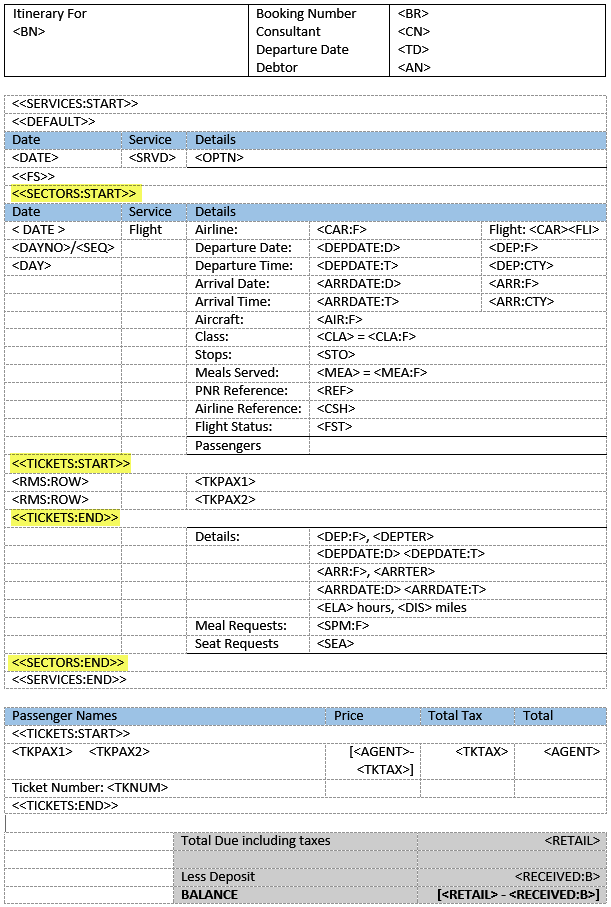
The Air Ticket <<SECTORS>> section must be used between the SERVICES tags and the <<TICKETS>> section can be used within the <<SECTORS>> tags or outside of the <<SERVICES>> section.
For details of the available Air Sector message substitution codes, see Air Substitution Codes.
| Section Tags |
|
|||
|---|---|---|---|---|
| <<SERVICES:START>> | ||||
| <<FS>> | Message Format Type from INI setting | |||
| <<SECTORS:START>> | ||||
| Flight details for each sector are output in this section | ||||
| <<TICKETS:START>> | ||||
| Passenger Name details are in this section | ||||
| <<TICKETS:END>> | ||||
| Sundry sector details can be anywhere between <<SECTORS:START>> and <<SECTORS:END>> | ||||
| <<SECTORS:END>> | ||||
| <<SERVICES:END>> | ||||
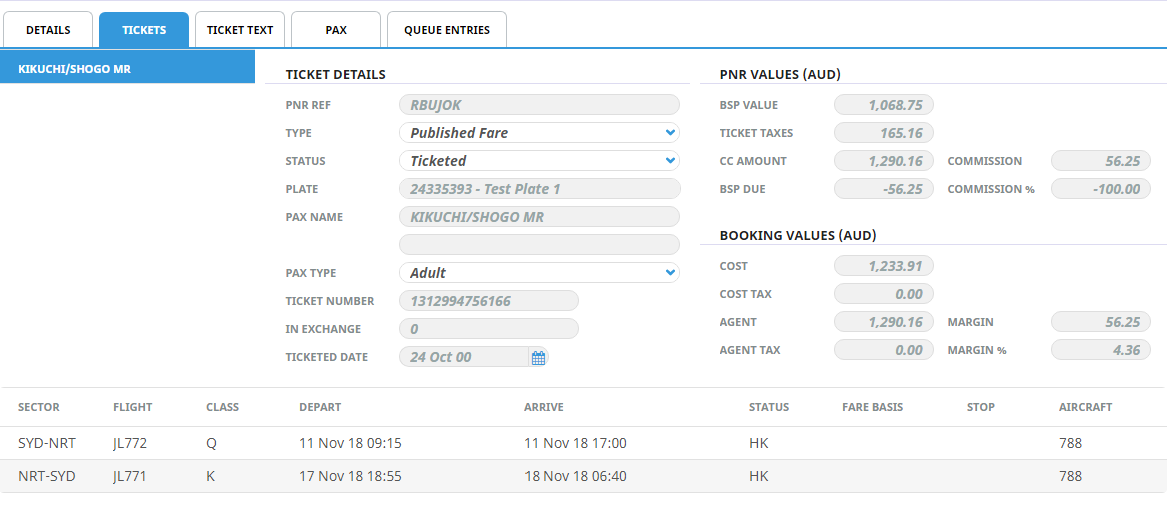
Example Booking Import PNR Flight Service
Example Air Ticket Service Message Template
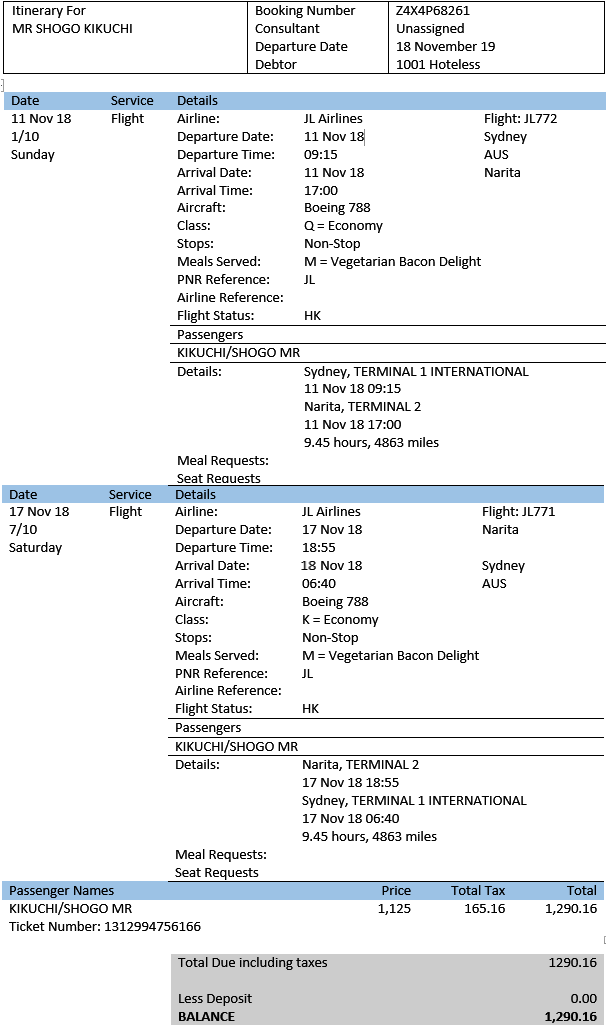
Example Air Ticket Service Message Output
Alternate Output of Sector Detail
Consolidate Flight Services
The ticket message template and output above is designed to output the individual flight sectors basically as single "services". They will appear in date order and (depending on the template layout) will be interspersed with other booking services - accommodation, sightseeing etc.
For bookings that may have complex multi passenger and/or multi CRS PNR's imported into them, the layout in date order of flight sectors from different PNR's may be confusing.
An alternate method of outputting the sectors is to use the 'Consolidate' modifier in which case all sectors of one PNR are output before sectors from any additional PNR's are output. The PNR's are output by date order of the first sector(s) - e.g., PNR 1 - first sector 28th August, last sector 02 September would be output in it's entirety before PNR 2 - first sector 29th August, last sector 01 September.
The Consolidate modifier is set with the services tag as <<SERVICES:START:CONSOLIDATE>>. The <<SERVICES:END>> tag remains the same.
Variable Sectors Formats
The <<SECTORS>> tag can also allow some variation in the way the sector detail is output where there are multi sector flights. There are 3 different modifiers - :FIRST, :MIDDLE and :LAST. These modifiers allow different formats for the flight sectors to be incorporated in the message template.
The :FIRST, :MIDDLE and :LAST modifiers are used in a template which has <<SERVICES:START:CONSOLIDATE>> and are in the format <<SECTORS:START:FIRST>> (where the format for the first sector(s) is defined), <<SECTORS:START:MIDDLE>> (where the sectors for all except the first and last sectors is defined), and <<SECTORS:START:END>> (where the format for the last sector is defined.
The example below has the same detail for the First and Middle sectors, and includes the Pax Names and Ticket details with the Last sector.
| Section Tags | Substitution Codes/Parameters | Substution Codes/Parameters |
|---|---|---|
| <<SERVICES:START:CONSOLIDATE>> | ||
| <<FS>> | Message Format Type from INI setting | |
| <<SECTORS:START:FIRST>> | ||
| <DEP:F> (Departure airport (full description)) | <DEP:CTY:F> (Departure city (full description)) | |
| <DEPDAT:D:T> (Departure date and time) | ||
| <ARR:F> (Arrival airport (full description)) | <ARR:CTY:F> (Arrival city (full description)) | |
| <ARRDAT:D:T> (Arrival date and time) | ||
| <CAR:F> (Carrier (full name) <FLI> (Flight number) | ||
| <<SECTORS:END>> | ||
| <<SECTORS:START:MIDDLE>> | ||
| <DEP:F> (Departure airport (full description)) | <DEP:CTY:F> (Departure city (full description)) | |
| <DEPDAT:D:T> (Departure date and time) | ||
| <ARR:F> (Arrival airport (full description)) | <ARR:CTY:F> (Arrival city (full description)) | |
| <ARRDAT:D:T> (Arrival date and time) | ||
| <CAR:F> (Carrier (full name) <FLI> (Flight number) | ||
| <<SECTORS:END>> | ||
| <<SECTORS:START:LAST>> | <DEP:F> (Departure airport (full description)) | <DEP:CTY:F> (Departure city (full description)) |
| <DEPDAT:D:T> (Departure date and time) | ||
| <ARR:F> (Arrival airport (full description)) | <ARR:CTY:F> (Arrival city (full description)) | |
| <ARRDAT:D:T> (Arrival date and time) | ||
| <CAR:F> (Carrier (full name) <FLI> (Flight number) | ||
| <<TICKETS:START>> | ||
| <TKPAX1> <TKPAX2> (Pax Names) | ||
| <TKNUM> (Ticket Number) | ||
| <RETAIL> (Ticket retail) | ||
| <<TICKETS:END>> | ||
| <<SECTORS:END>> | ||
| <<SERVICES:END>> | ||