
Allocation Release Dates
How do I enter a release date in allocations?
There is the ability to selected release field format differences from within the Allocations Details screen. There is a new checkbox called 'Show Release As Date' which when selected will alter the format of the 'Release' field with a calendar selector, and the column heading changes to 'Date'.
This article will help you to:
-
Understand the new feature
-
Know where and how to access this setting
Overview
This feature was designed to assist organisations who manage a large volume of allocations release back to the supplier on a fixed date.
Enter an allocation release date
This feature is available within the Allocation Setup screen and applies to the allocation selected, allowing organisations to format this field on an allocation by allocation basis.
-
Display the Allocation on screen, or create a new Allocation.
-
Open the Setup tab.
-
Tick the ‘Show Release As Date’ checkbox.

-
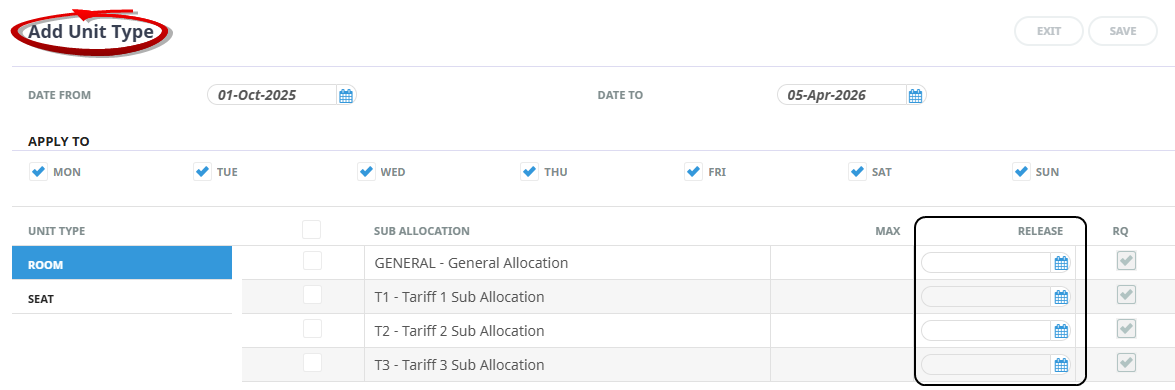
Open the Days tab and select Add Unit Type. You will see the Release column now has a Calendar Selection icon where you can enter a Release Date.
-
If viewing an existing Allocation Days tab, you will see the Release column has changed to a Date heading, and has a Calendar Selection icon where you can enter or amend Release Dates.
Conclusion
This feature is easy to apply field format differences between allocations to suit how you receive and manage your supplier allotments.