Auto Allocation and Auto-Update Service Status
Can Tourplan automatically update the service status and take allocation?
Yes Tourplan can be configured to automatically take from allotments and update the service status.
This article explains
-
The INI Settings required for service statuses
-
How the system validates service statuses
System INI Settings - For Service Status
The following are the available INI Settings for Service Status:
-
SERVICE_IT_STATUS: Initial Service Status
The default 'initial service' entry status code of a service line in bookings.
The status applied to the INI must be pre-setup to allow ‘Allocation’ for the service status setting within Code Setup.
-
SERVICE_OK_STATUS: Service Allocated OK Status
The service status indicates the booking service has been fully allocated for total room numbers and total nights required for the allotment booking.
The status applied to the INI must be pre-setup to allow ‘Allocation’ for the service status setting within Code Setup.
-
SERVICE_PA_STATUS: Service Partly Allocated Status
The service status indicates the booking service has only been partially allocated to total room numbers and total number of nights required for the allotment.
The status applied to the INI must be pre-setup to allow ‘Allocation’ for the service status setting within Code Setup.
-
SERVICE_RQ_STATUS: Service On Request Status
The service status indicates the booking service has no allotment available.
The status applied to the INI is not required to allow ‘Allocation’ at the service status setting within Code Setup.
System auto-allocation and auto-update service status validations:
-
1st validation is against the Booking Status
To allow the system to initiate the validation, the booking status applied needs to allow ‘allocation’ (check the Booking Status setting within the Code Setup application).
* If the Booking Status does not have the allocation checked in Code Setup it will not be able to hold allocation. The service being saved into the booking will follow the INI setting, no allotment will be allocated to the service (even if it is available). All services saved in the booking with this condition will default to a service status which = Initial Service Status.
-
2nd validation is against the service option if there is any allotment available
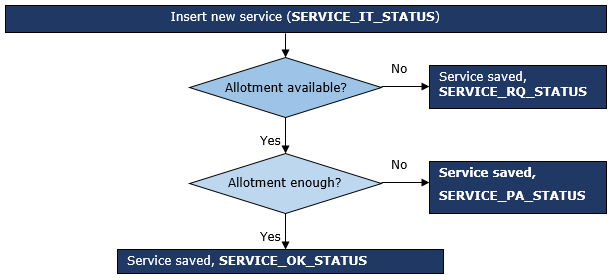
When there is available allotment, the service status will be updated to either Service Allocated OK Status or Service Partly Allocated Status.
If no allotment is available then service status will be updated to a Service On Request Status.
Flowchart for service status triggers:
Following applies to a booking where the Booking Status allows allocation.