
System Default Dates
Is it possible to change the Booking/PCM Date Entered default filters?
Yes the default dates are controlled by an INI Setting. Please speak with a system administrator before amending these.
Over time, search date settings may need to be adjusted to stay useful. The system sets the default search dates to the previous year, this helps limit results to a reasonable time period and reduces the need for users to manually update the 'From' and 'To' date fields.
When searching for bookings, there are four date fields - Travel Date From/To and Booking Entered Date From/To.
INI Settings are used to define the default 'From' value for the Booking search filters:
-
Booking Date Entered From
-
Booking Travel Date From
-
PCM Date Entered From
-
PCM Travel Date From
Booking Search Filter Dates
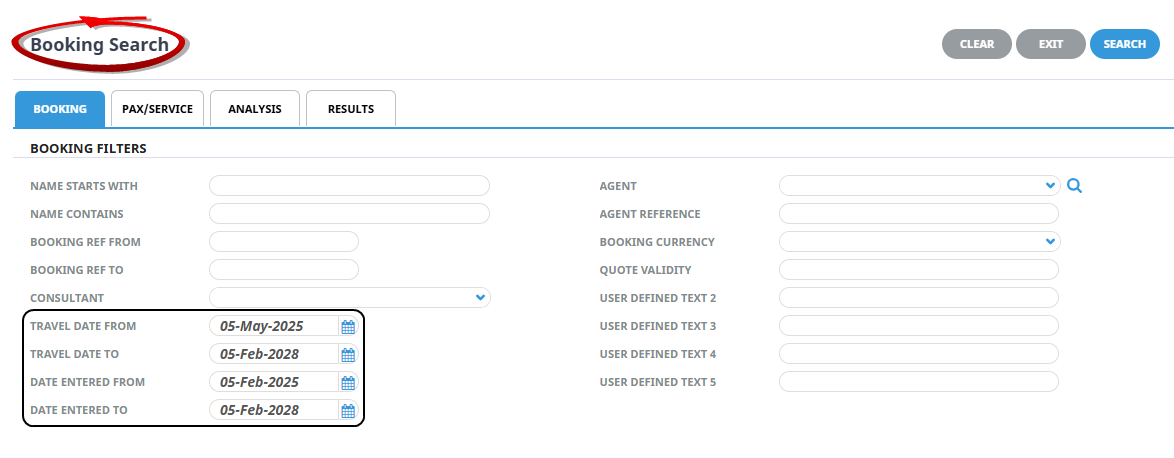
The default Travel Date From and Date Entered From can be edited via an INI Setting. It is defaulted to 1 year before the current date without amending the INI Setting.
The Travel Date To and Date Entered To cannot be changed as thee field defaults are hard coded to be 2 years from the current state.
Configure 'Booking Entered From' & 'Travel Date From' Settings
-
Open System > Code Setup > INI Settings > System > INI Settings.
-
DEF_BKG_FIND_FROM_DATE - Per User/All Users. The default 'From' value for the Date Entered From.
Can be either a special date or number of months. If months is used, the value must be preceded by a minus (-) sign eg, -12
-
DEF_BKG_TD_FROM_DATE - Per User/All Users. The default 'From' value for the Booking Travel Date
Can be either a special date or number of months. If months is used, the value must be preceded by a minus (-) sign eg, -12
Note: Once the INI Setting is saved, close the current Booking tab or CTRL + F5 to refresh the tab to indicate the changes made.
PCM Search Filter Dates
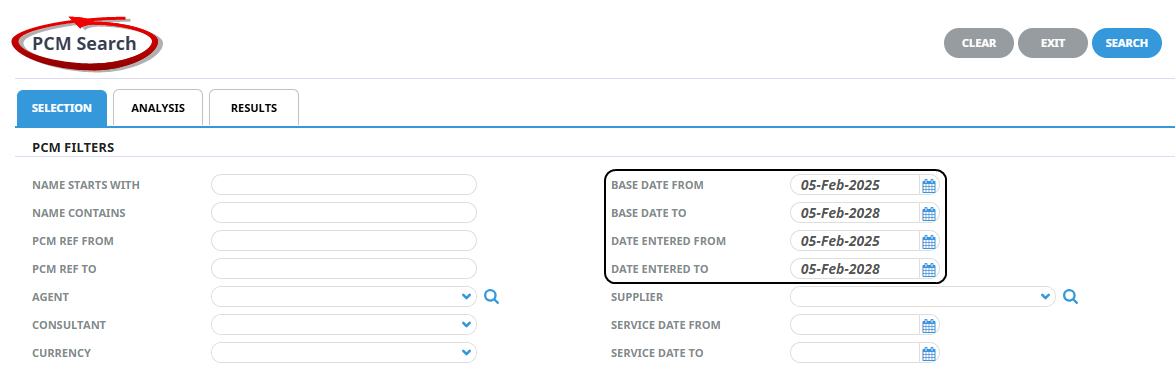
The default Base Date From and Date Entered From can be edited via an INI Setting. It is defaulted to 1 year before the current date without amending the INI Setting.
The Base Date To and Date Entered To cannot be changed as these field defaults are hard coded to be 2 years from the current date.
Configure PCM Base Date From & Date Entered From settings:
-
Open System > Code Setup > INI Settings > System > INI Setting:
-
DEF_PCM_FIND_FROM_DATE – Per User/All User - The default 'From' value for the Date Entered From.
Can be either a specific date or number of months. If months is used, the value must be preceded by a minus (-) sign—e.g., -12.
-
DEF_PCM_TD_FROM_DATE – Per User/All User - The default 'From' value for the Booking Travel Date.
Can be either a specific date or number of months. If months is used, the value must be preceded by a minus (-) sign - eg., -12.
NOTE: Once the INI Setting is saved, close the current Booking tab or CTRL + F5 to refresh the tab to initiate the changes made.