
Loading interactive content…
There is an alternative feature available to organisations who may require a resource assignment to involve more than one category. This is designed for organisations who may have another layer of resources to assign to a group or individual services.
For example; a common scenario is for passengers to be assigned to a particular vehicle, driver and guide for their service. Some organisations may wish to offer another meet and greet service provided by the tour operator, or perhaps a hotel representative is to be assigned on arrival. The traditional method of Resource Assignment setup would not allow two records to be held for one service as required in this situation.
Examples may include:
HTR - Hotel Representative
MET - Meet & Greet
TRP - Tour Representative
GRL - General Assignement
TAG - Tour Agent
Create an Assignment Category
-
From the Home menu, select
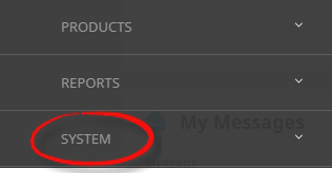
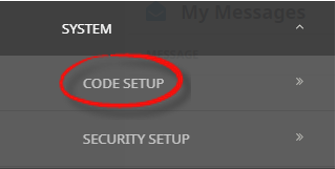
 Home > System > Code Setup.
- Click the Home menu to expand it:

- Click the System menu option to expand it:

- Click Code Setup to go to the Code Setup menu:

- Click the Home menu to expand it:
-
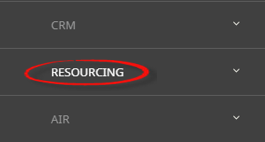
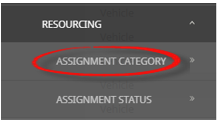
From the Code Setup menu, selectResourcing > Assignment Category.
- Click the Code Setup menu to expand it:

- Click Resourcing to expand the Resourcing menu:

- Click Assignment Category to open the Assignment Category screen:

- Click the Code Setup menu to expand it:
-
On theAssignment Category screen, if the Assignment Category required is not already in the list, click Insert.

-
On the blankAssignement Category screen, enter a Code and Description.

- Review the completed screen.
-
ClickSave to keep the changes.

-
ClickExit to discard any changes.



NOTE: Category records cannot be deleted if they have been attached to a resource, or used in an assignment.
About Assignment Category Fields
Code
This field is used to identify the Assignement Category. The code can be up to 3 characters.
Description
Is a descriptive field to describe the Assignment Category code. Example descriptions are available at the top of this page, this field allows up to 30 characters.