
PCM References
Can PCMs have a reference number?
In Tourplan NX Version 2.5 there is an option to assign reference numbers to PCM Quotes and PCM Packages.
The introduction of PCM reference numbers is designed to provide a quote reference number for messaging. The inclusion of Branch and Department configuration within the PCM Reference offers operators PCM pricing consistency with FIT and Group bookings when Branch or Department pricing variations are configured.
PCM References Numbers
A PCM Reference INI Setting automatically assigns a numerical reference to PCMs. Numerical sequencing operates independently and is not associated with FITs and Groups booking references.
Review PCM Reference INI Setting
-
Open System > Code Setup > INI Settings > System.
-
Locate NEXTPCMREF INI Setting.
-
View the Next PCM Reference Number value.
-
The User ID should be set to ALL for this setting.
Branch Department Setup
Code Setup Branch & Department configuration includes an ‘Available to PCM’ checkbox. When selected the Branch and Department options are available within the PCM module. Assigning Branch & Department fields allows branch specific tax handling, and discount commission matrix rules can be applied to PCM Branch and Departments allowing price variations for sectors of your market.
Create a PCM Branch
-
Open System > Code Setup > Financials > Branch.
-
A list of Available Branches will display.
-
Click on the PCM checkbox to allow the branch to be selected as a PCM Branch.
Create a PCM Department
-
Open System > Code Setup > Financials > Department.
A list of available departments will display
-
Click the PCM checkbox to allow the Department to be selected as a PCM Department.
Fields in PCMs
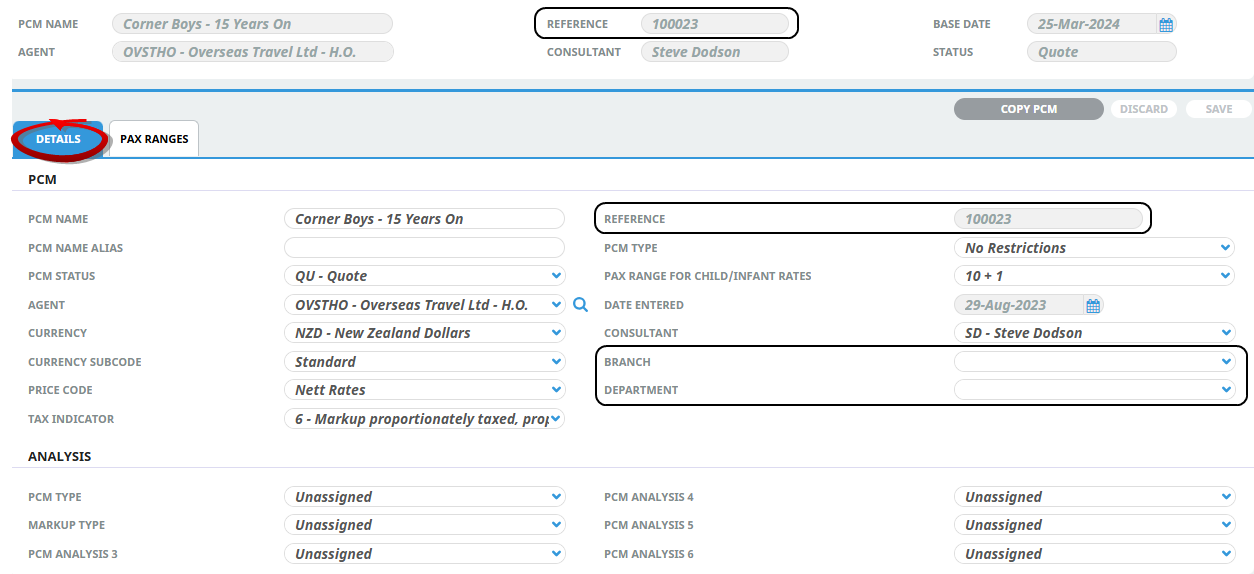
The PCM Reference number field is visible within the header of PCMs, and maintenance of the Branch and Department fields is available from the PCM Details, General Setup screen. Recalculation functionality is in line with FITs and Groups modules, once a Branch and Department is assigned in a PCM and an amendment to these fields occurs, a recalculation of the quote or package is triggered.
PCM Details > General Setup > Details Tab, PCM Reference, Branch & Department Fields.
Copy & Search PCMs
Copying an existing PCM automatically assigns a new numerical code to the new PCM, the branch and department can be amended from the PCM details screen.
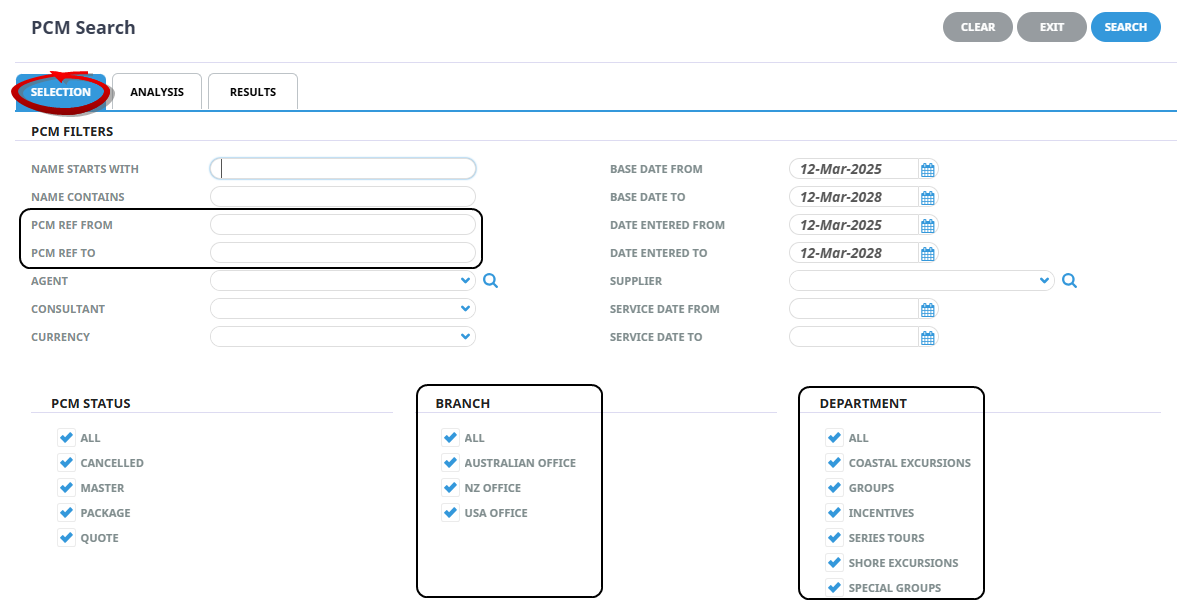
PCM References are searchable system wide, weather you are searching to insert a PCM into a booking or simply looking to view an existing PCM; previous and next buttons allow you navigate the PCM Reference search results list.
PCM Search Fields
Messaging
Messaging substitution codes can be used within the Header of PCM Messages. The substitution codes for these fields are as follows:
-
PRN - PCM Reference Number
-
PBR – Branch
-
PDP - Department