
Pax CRM Explained
What is the Pax CRM?
The Pax CRM (Customer Relationship Management) application allows you to collect, store, and retrieve data at the individual passenger level. There are numerous benefits to using Pax CRM within Tourplan NX; custom profile information can be configured uniquely to your organisation's needs.
The Pax CRM application captures passenger information assigns a unique Pax Record/ID number to each pax, removing the need to repeatedly enter the same passenger information for individuals who travel with you regularly; simply look them up and attach them to an FITs booking. The Pax CRM allows the grouping of passengers, if required, and lets you pro-actively store and manage passenger information outside of the booking, i.e. without the need for entry into a booking to maintain your passengers’ details.
Considerations
When thinking about implementing the Pax CRM functionality, there are several things to take into consideration.
Pax Profile Information
Firstly, understanding the type of default information captured within the Pax CRM application is important, and the Pax CRM is pre-configured to record the following information:
-
Name, Name Alias, and DOB information.
-
Passport details.
-
Contact details.
-
Any groups they belong to.
-
Existing bookings.
-
Any custom “general text” fields.
Pax CRM provides the ability to define and capture additional information in order to expand a passenger's profile as per your organisation’s requirements, such as:
-
Loyalty programmes.
-
Travel preferences.
-
Dietary requirements.
-
Visas held.
-
Vaccine certificates.
-
Brochure requests.
It’s important, to be aware of any custom (user-defined) general text fields set up for Pax details when your system was created. You may wish to change how that information is stored within the new Pax CRM.
NOTE: If your organisation only requires the collection of default information, defining additional information is not a requirement for the Pax CRM application to function.
System Integration
Next, it is best to consider which areas of the Tourplan NX system you wish to integrate the Pax CRM application with. Passenger details can be collected from both FITS bookings and group bookings. However, the Find Existing Pax function, which allows a user to add existing passenger details to a booking from the Pax CRM, is only available from within the FITS application.
Group Types
Another important consideration is if passengers need to be grouped in a particular way. Group Types can be used to organise, search, and analyse Pax information, for example, identifying leisure vs. corporate travellers.
CRM Access
The final consideration before rolling out the Pax CRM is who within your organisation will have access to the functionality. As with other applications within Tourplan NX, access can be given to all users or limited to certain individuals and/or groups.
Implementation
To implement the Pax CRM your organisation will need to;
-
Build the Pax profile fields.
-
Integrate the CRM application into the required booking areas.
-
Provide access to the CRM for users and/or groups of users.
Building the Profile Template
Custom fields are configured within Code Setup, creating unique profile entry fields:
-
Create Profile Entry Types, these are the headings or descriptions used to record passenger information.
-
Enter Profile Entry Codes, which are sub-categories that will be used to define additional Pax information for each of the profile entry types created.
-
Enter Pax Group Types, these are the groupings that passengers can be organised into, which, as mentioned previously, allows for searching and filtering by group type.
Integrate the Pax CRM into Booking Applications
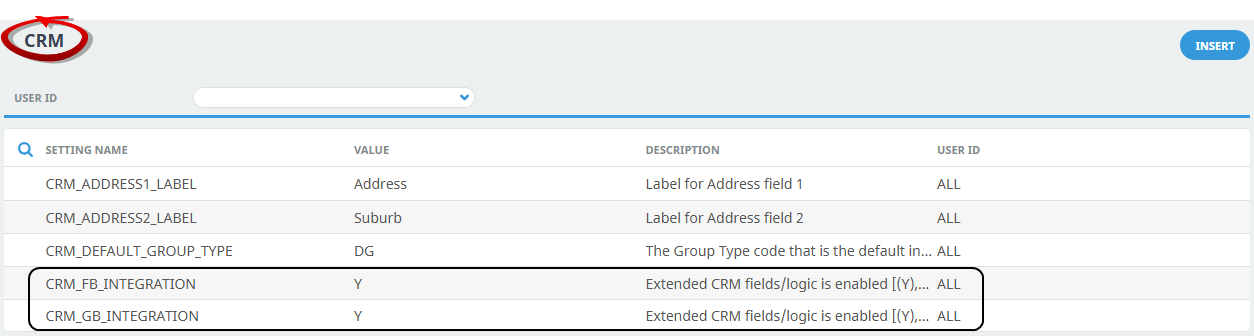
Within Code Setup, integrate the Pax CRM with the booking application required by your organisation. Defining the Setting Name for FITs Integration, or Groups integration allows access to entering the Pax profile information from within bookings and, for FITS bookings, making the Find Existing Pax functionality available, i.e. within FITS > Booking Details > Pax Travelling.
NOTE: The CRM INI setting CRM_DEFAULT_GROUP_TYPE determines the default group that all new pax will be assigned to.
Provide Access to Users and or Groups
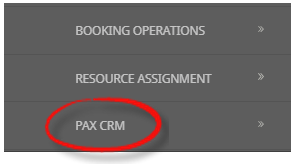
As with other applications within Tourplan NX, access is granted to the required users or groups via security settings within the Security Setup area. Once this has been actioned, all users who have been provided with access will see PAX CRM as a Tourplan NX menu item under Operations.
NOTE: Security setting amendments can only be actioned by users with sufficient system permissions within Tourplan NX. Configuration should be done in consultation with your Tourplan system administrator.