
Loading interactive content…
Enable An Agent
How do I enable an agent for webConnect?
The agent will need to be granted Internet Access to webConnect, and be provided with a Login and Password.
Access is granted from within Tourplan NX within each Debtor
Granting Access To Agents
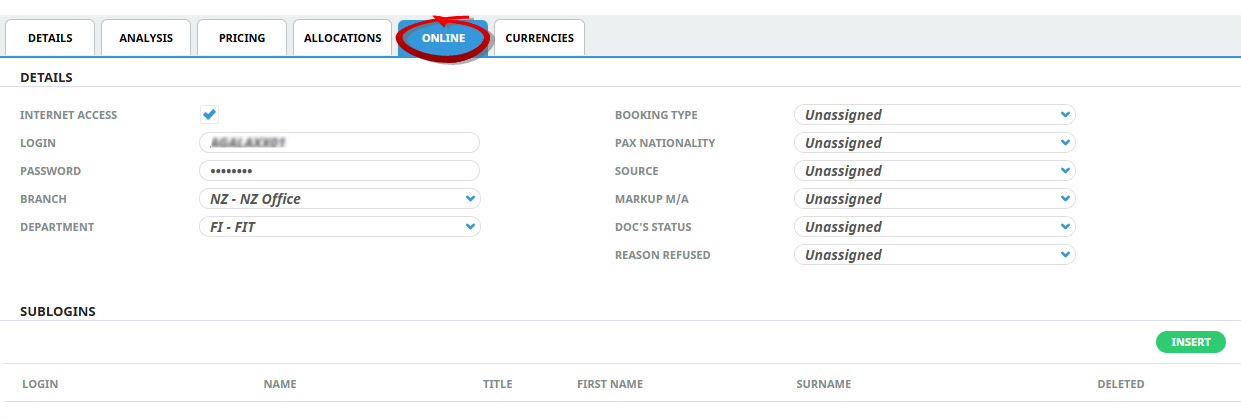
- With the Debtor displayed on screen, open the Online tab.
- Check the Internet Access checkbox.
- Enter a Login, this can be pre-populated with the Debtors code if the INI Setting is enabled.
- Create a unique Password.
- Select a Branch and Department, and if Analysis fields are used, assign Analysis fields from the dropdown.
-
To keep the changes, click
 Save.
Save.

-
ClickDiscard to discard all changes.

For example: This agent (A Good Agent) has been provided with Internet Access. A login and Password is entered, and in this scenario the Branch and Department.
NOTE: The password may need to include an Uppercase, Lowercase, Number and Symbol. It will depend on the password security requirements of your NX System.
Click on the link for information on Agent Sub Logins.