
VCC Functionality - Booking Internal Contract Rates
Can I use VCC functionality for internal contract rates?
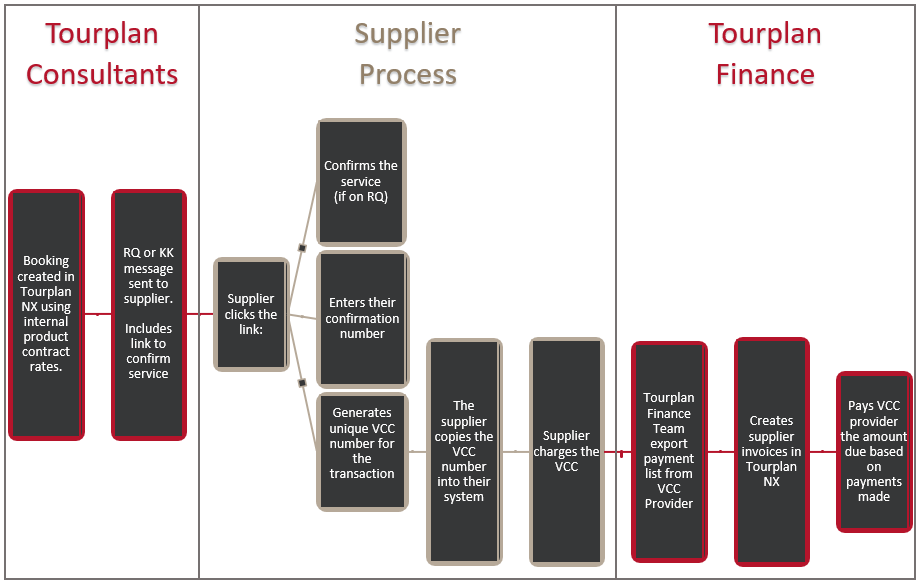
Yes, Virtual Credit Cards (VCC) can be used to pay for services that are using internal contract rates. Tourplan clients can provide a standalone web application, giving suppliers the ability to:
-
Confirm services
-
Generate a VCC payment to charge for services
NOTE: Cancellation of a service in Tourplan, which was confirmed by this process, will automatically cancel any associated VCC.
Key Benefits
Organisations using the VCC payment option are able to consolidate all payments and make one payment to their VCC provider. Whilst providing suppliers with the ability to update a service status, provide a confirmation number and receive immediate payment.
Bookings made via internal contract rate workflow:
How do i set up VCC payment for internal contracted rates?
You will need to have an account with a third-party VCC provider, provide your credentials to Tourplan to configure your VCC connection and enable a Supplier Confirmation webpage. Your organisation will be required to:
-
Obtain a third-party VCC account - For Tourplan to configure your VCC connection, you will need to have account credentials for a third-party provider.
NOTE: WEX is currently the only third-party VCC provider supported by Tourplan.
-
Submit a VCC Support Request - Supply the third-party VCC provider credentials and required settings to your local Tourplan Support office via a VCC Support Request. (for more information please see Understanding the Client VCC Request Form)
-
Specify a Supplier Confirmation Application – To provide suppliers with a booking confirmation webpage a URL must be specified within INI Settings. See your local Tourplan support office for more information.
-
Update the Supplier Confirmation message – A substitution code <TOKEN:SC:alternative text> within the supplier confirmation message is required to link to the supplier confirmation webpage.
NOTE: The link provided in the supplier confirmation message is only valid for 7 days or 1-time use. After this, another supplier confirmation message is required to generate a new link to the booking confirmation webpage.
-
Activate VCC payment for the Supplier – The payment option must be activated within Tourplan NX via the Creditors > Analysis Tab.