
Stop Selling Product
How do we stop a rate from being made available if the rate is no longer valid?
If there are rates contracted for certain periods of the year, they then become invalid and not selectable past a specific date. You can use the 'Sales Period' to close off these rates when they are not valid.
However they may still be visible with an incremented rate on FITs when searching past the 'Sell To' date. This is often because organisations may have enabled a system wide INI Setting for you company to be able to sell the service with a % incremented until a new rate is made available from the supplier.
The way to stop the service from being sold if it can no longer be sold is to make the rate status 'Terminal' within the date range.
Stop Selling A Product
-
Open the Product Option.
-
Select the Rates menu.
-
Click the Rate Set tab.
-
Change the Rate Status to Terminal.
This means that if the booking travel date is after the Rate Period (Travel Date To) the Consultants will not see the Rate in the FITs application and the product cannot be sold.
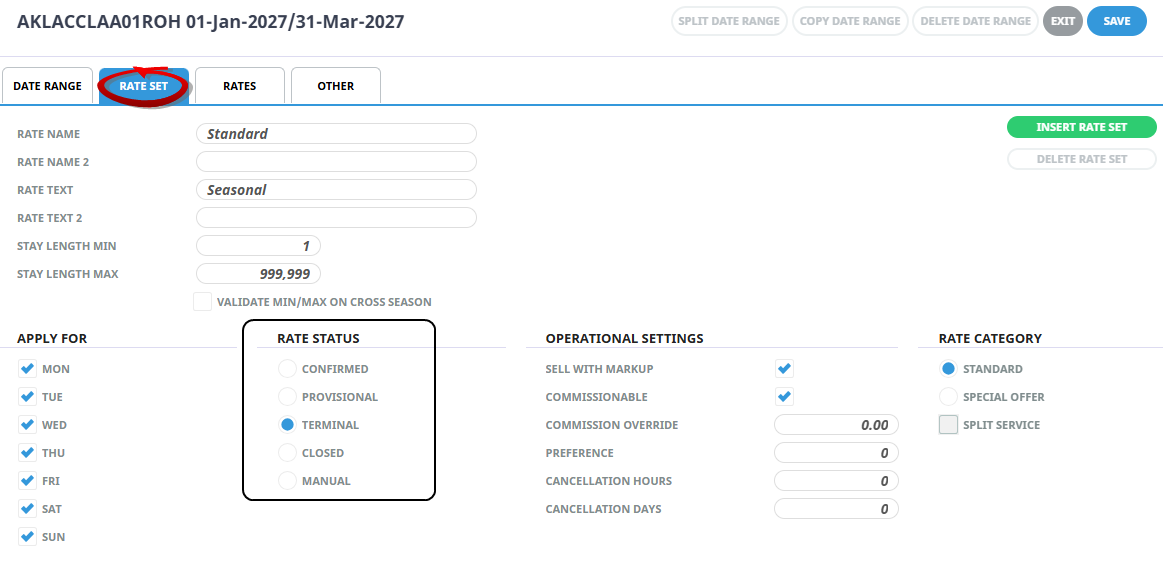
In this example the rate would be able to be sold up until the 31st March 2027, the product would not show for travel after this date.