A flight service category allows multiple flight sectors to be entered into a quote or booking. The product is set to a manual rate service which allows a total value to be entered for all flights attached. The total value of the airfare will be saved against the first flight service however flight details for all sectors are individually detailed within multiple pick up and drop off fields. We recommend speaking with your local Tourplan Support office before inserting manual flight service category rates into your system. The team will discuss the alternative options available when loading flight product.
Flight Service Setup - Screen Overview
| Tab and Field | Description of Value Entered |
|---|---|
|
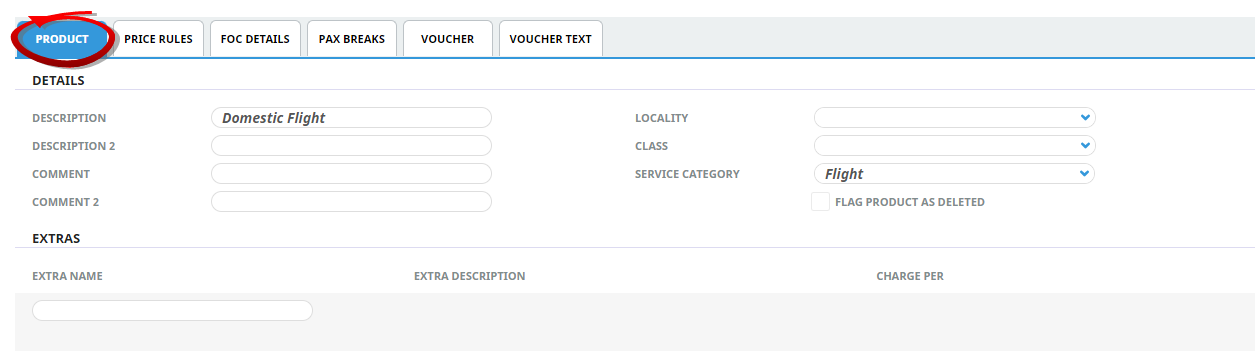
Product Setup > Product Details > General > Product Tab |
|
|
Extras |
N/A |
|
Service Category |
Flight |
|
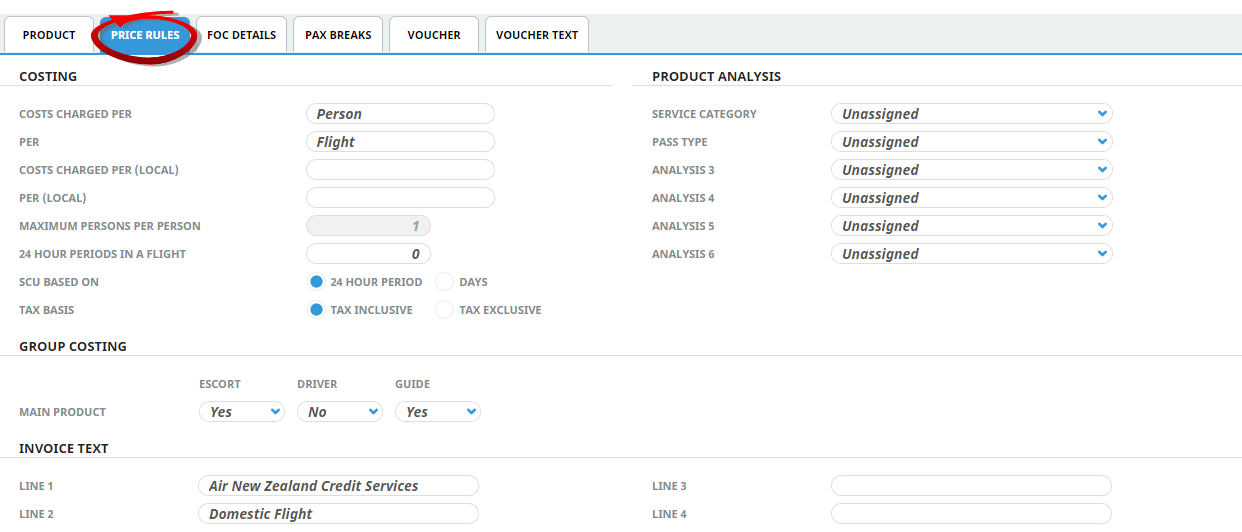
Product Setup > Product Details > General > Price Rules Tab |
|
|
Costs Charged Per |
Per ‘Person’ per ‘Airfare' |
|
Maximum persons Per airfare |
This will depend on the service option being set up. |
|
How many 24 Periods in a Day |
0 |
|
SCU Based On |
Leave as default 24 hrs |
|
Group Costing |
Escort – Yes, Driver – Yes, Guide Yes |
|
Product Setup > Product Details > General > FOC Details Tab |
|
|
Product Setup > Product Details > General > Voucher Tab |
|
|
Print Voucher |
|
|
Voucher Creation |
One voucher |
|
Product Setup > Product Details > Policy > Policies |
|
|
Cross Season Policy |
N/A |
|
Product Setup > Rates > Rate Set Tab |
|
|
Date Range |
Extended date range From Date - End |
| Rate Name | Standard |
|
Product Setup > Rates > Other Tab |
|
|
Service Voucher Text 1 - 10 |
N/A |
|
Product Setup > Content |
|
|
Amenities |
N/A |
|
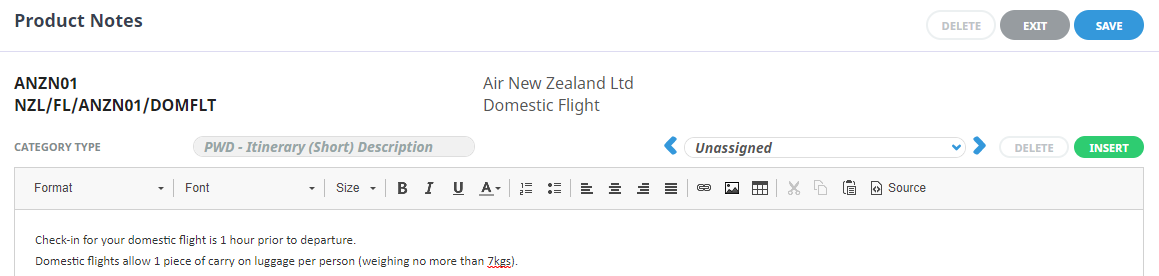
Product Notes |
As required |
|
Itinerary |
N/A |
|
Product Setup > Operation > Message Defaults |
|
|
Message Format |
Relevant Flight related message format |
Create Flight Product
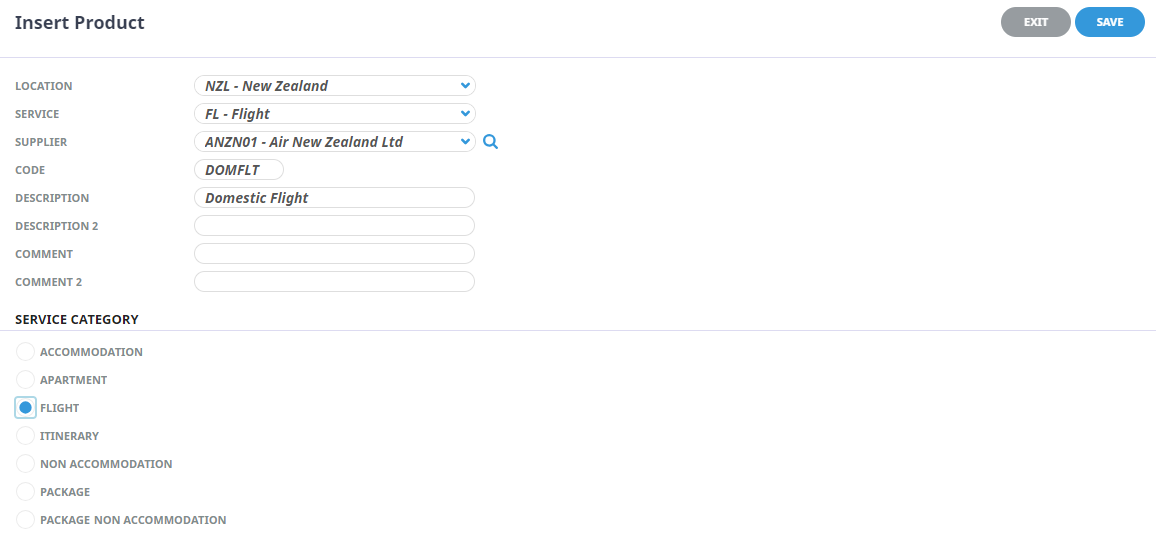
The first step to inserting product is to create the shell of the product into the database. The procedures which follow on allow further details to be inserted for this flight product.
Location
Select a location code from the drop-down list, or type the location code. Location codes must already be setup in the Code Setup application, Create a Product Location.
Service Type
Select a service code from the drop-down list or type the Service Code. Service codes must already have been setup in the Code Setup application, Create a Product Service Type.
Supplier
Select a supplier from the drop-down list, or type the Supplier Code. Suppliers must already be setup in the Creditors application, Create a Supplier.
 ) to the right of the Supplier fields can be used to search based on primary search criteria of Supplier Code; Name Contains; Supplier Chain, plus the additional criteria of Language Code; Post Code; and any of the 6 available Analysis Codes that can be attached to the supplier.
Code (Autocaps)
Enter a Product Code. Examples of commonly used codes are:
- Flight - Flight Services are a 6 character code to identify the flight segment information.
Service Category
The product must have one of these radio buttons checked. The service category determines what data pre-populates some of the setup fields and enables the system to use logic specific to the category to correctly generate pricing.
| Radio Button | Definition |
|---|---|
| Flight | Identifies a flight product that will allow sector by sector lines to be inserted into a quote or booking. |
Product Tab
Inserting Product Detail allows the product to store a brief description of the flight service. These are the fields which will be available to consultants at the time of the booking. Amendments to the Description and Comments fields can be performed here.
Price Rules
Price Rule settings identify how the service is to be sold, manual flight services allow the rate to be entered at the time of booking and therefore have a 0.00 rate value attached to them with a Manual rate defined in the product setup. Price rules would generally reflect per person per flight.
Rates
There are 4 Tabs which allow specific rate information to be stored per date range, a flight service only requires minimal data entry.
- Date Range - Unlimited date range which allows the system to insert the flight service for all future dates.
- Rate Set - Rate Status should be set to manual.
- Rates - Leave the service as a 0.00 rate entry.
Content
This is the area which will store the necessary text information for your flight.
- Product note text can be used as message text within booking agent messages and PCM agent messages. The note will then attach to each flight service included in your manual flight service.