
Loading interactive content…
Using the ‘Stay Length Min’ and ‘Max’ fields can force Quotes or Bookings to adhere to any Minimum or Maximum length stays that have been imposed by a supplier.
Set a Minimum or Maximum Stay Period
- Make sure at least one rate has already been added (see Add a Rate).
- Open the rate you wish to edit by clicking its Rate Period line in the list of rates.
-
On the Date Range screen, switch to the
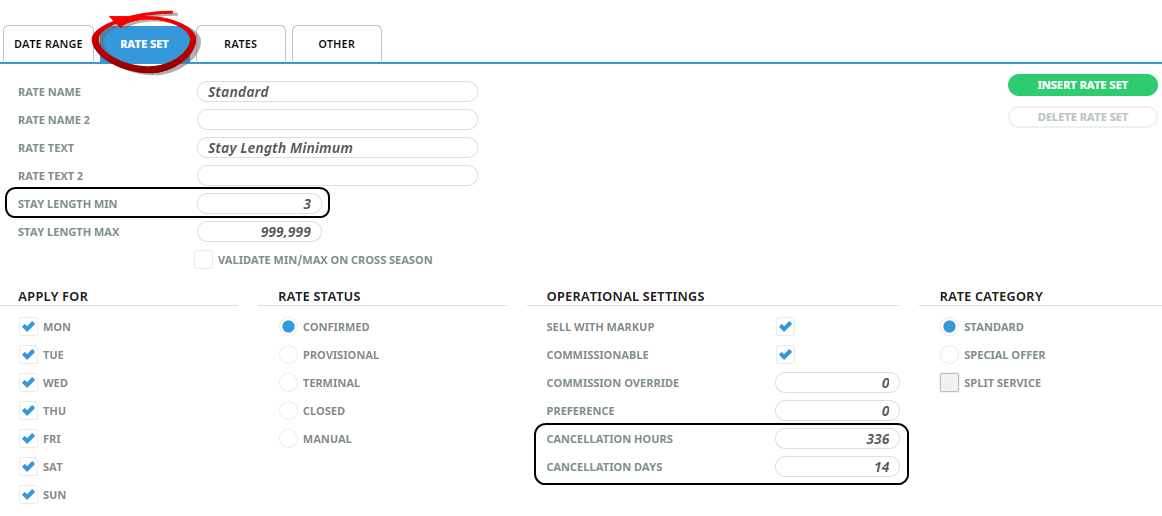
 Rate Set tab and set the Stay Length Min value to 3 (for this example). Also set values for Cancellation Hours and Cancellation Days.
-
ClickSave to keep the changes.

-
ClickExit to discard any changes.

The Stay Length Min field has been changed to ‘3’ and (as an example) the Cancellation period has been changed to 14 days.
If an attempt is made to book this product from a booking within the cancellation period, a warning message is displayed advising that it is inside the cancellation period. However, if User Company's are using the cancellation policy function within the Supplier or Product cancellation policies the system will apply necessary fees. The Cancellation hours/days fields seen here will only show consultants at the time of booking if the stay is within the cancellation period.
Repeat this procedure on any other Price Codes within the date range that these conditions apply to. Don’t forget to edit the rates for subsequent Price Codes that are changed.
NOTE:
- Since Tourplan is aware that these conditions expire on 31 March, should a stay go past this time, then the standard conditions would apply. This means that for any nights past 31 March, the standard rate (that applies for the period 01 April - 30 November) would be applied. In this example, there is no need to edit the Days of the Week in the ‘Apply For’ section of the screen when imposing Minimum/Maximum stays, since the conditions imposed apply to a date period, not specific days of the week (although this situation can arise; e.g. a rate valid for a minimum 3-night stay, provided it's on a Monday, Tuesday or Wednesday in this scenario the days of the week checked would be: Mon, Tue, and Wed).
-
The Maximum Stay field is not often used for accommodation services - generally only when the rate changes after a period of stay; e.g. a rate valid for 1 - 4 nights and a different rate for 5 nights and longer. A more common use is in the setup of Rental Vehicle rates where different rates apply for different lengths of hire and examples are given in Admission/Entrance Fee/Meals.