
Loading interactive content…
NX v2.5
This page is intended for Tourplan NX clients and identifies functionality changes included in recent Version 2.5 Releases. It will be added to as further patch releases are made relating to this particular version.
NOTE: Any development related queries will continue to be responded to by your local Tourplan Support Team via the standard ticketing process.
Version 2.5 Patch Release
 2.5.12.1 - Built 30th April 2026
System Setup
Messaging Codes
Sub login Messaging Codes: New substitution codes allow agent sub login credentials to be dynamically inserted into message templates.
Sub login details can now be automatically populated in emails within Booking Agent Messages; the following substitution codes will generate sub login information from either within the email container section or within the message header for the following substitution codes:
-
<SUBAGENTLOGIN> - Agent Login code that is used by hostConnect
-
<SUBAGENTLOGINNAME> - The Name associated with the sub login code
-
<SUBAGENTLOGINTITLE> - The Title associated with the sub login
-
<SUBAGENTLOGINFNAME> - The First Name associated with the sub login
-
<SUBAGENTLOGINSNAME> - The Surname associated with the sub login
-
<SUBAGENTLOGINEMAIL> - The Email associated with the sub login
-
<SUBAGENTLOGINMOBILE> - The Mobile Number associated with the sub login
-
<SUBAGENTLOGINPHONE> - The Phone Number associated with the sub login
-
<SUBAGENTLOGINFAX> - The Fax Number associated with the sub login
Operations
Resource Assignment
We’ve introduced powerful improvements to streamline how services and third-party resources are managed and assigned.
What’s new:
-
Assignment Categories: Services can now be grouped under defined assignment categories, making it easier to organise and manage related work.
-
Externally Provided Resources: Resources can be marked as externally provided, enabling seamless handling of third-party suppliers.
-
Automatic Assignment Creation: Grouped services from external suppliers can now be automatically converted into assignments, reducing manual steps.
-
Category Selection During Grouping: Users can assign a category at the time of grouping for better structure and clarity.
-
Predefined Group Colours: Visual colour-coding has been added to improve visibility and make service groups easier to identify at a glance.
Security Settings
Allocations
We’ve improved the Update Allocations security setting to include delete allocation functionality. Based on the security setting assigned, Users or User Groups can now be granted or revoked access to update and now delete allocations.
2.5.11.1 - Built 30th January 2026
Financials
Tour Window
Booking markup percentages in the Tour Window are now rounding to 3 decimal places, improving accuracy of markup values between retail and agent amounts.
Exchange rate values in the Tour Window (Voucher tab) are now rounded to 4 decimal places, providing greater precision and clarity for currency-related calculations.
Credit Notes
Settled invoices are now rounded to 2 decimal places when filtering Credit Notes. Very small decimal variances (caused by currency calculations or rounding differences) could prevent invoices from being recognised as settled. This enhancement ignores insignificant discrepancies, resulting in more reliable credit note matching.
Product
Copy Product
Invoice Text 1 and Invoice Text 2 will now automatically update when the supplier name or product description is changed in a copied product. This helps keep invoice details accurate and consistent, reduces manual updates, and minimises the risk of incorrect or outdated information appearing on invoices.
Operations
Booking Operations & Service Operations
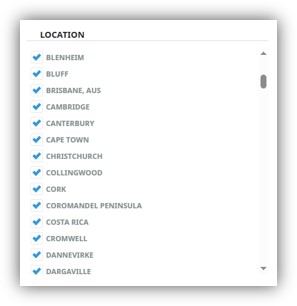
Bulk operation filters have been improved to support multi-location selection. You can now search and filter across multiple locations at once using a location checklist, making bulk actions faster, more flexible, and easier to manage. A multi select location check list is now available for the following filters:
|
Booking Operations
Service Operations
Accounting
Bulk Documentation
|
|
Bookings
Optional Services Within Packages
This enhancement is for organisations using the Discount Commission Matrix and Optional Services offered in Packages. The discount commission markup rules now apply to packaged optional services. This ensures more accurate calculations, reduces manual adjustments, and provides greater consistency across packaged offerings.
Recalculation
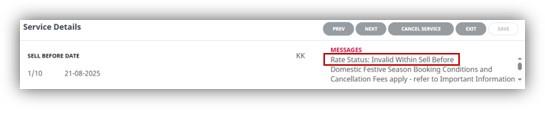
Product rate “sell before travel” (early bird) rules are now applied when bookings and services are recalculated. If a service no longer meets the early bird criteria, it will be flagged with a warning.
The warning received depends on organisations RATERULECHECK setting.
-
If set to No, the service line turns red to indicate its invalid.
-
If set to Yes, a warning message displays.
And a Service line message within Service Details displays:
PCMs
Inserting PCM Module Into PCM
PCMs can now be added to existing PCMs (or component tours) even when rates are unavailable. Instead of blocking insertion with a warning, the PCM will be inserted and highlighted in red to indicate that rates could not be found. This change allows users to continue building PCMs without interruption, whilst highlighting further maintenance is required.
Messaging
Service Selection
Messaging output has been enhanced when using the <TERMS> substitution code. The code <TERMS> will now display payment terms: (number of) days after service payment, providing clearer and more accurate communication of payment requirements.
2.5.10.1 - Built 17th November 2025
Bookings & Quotes
Insert PCM
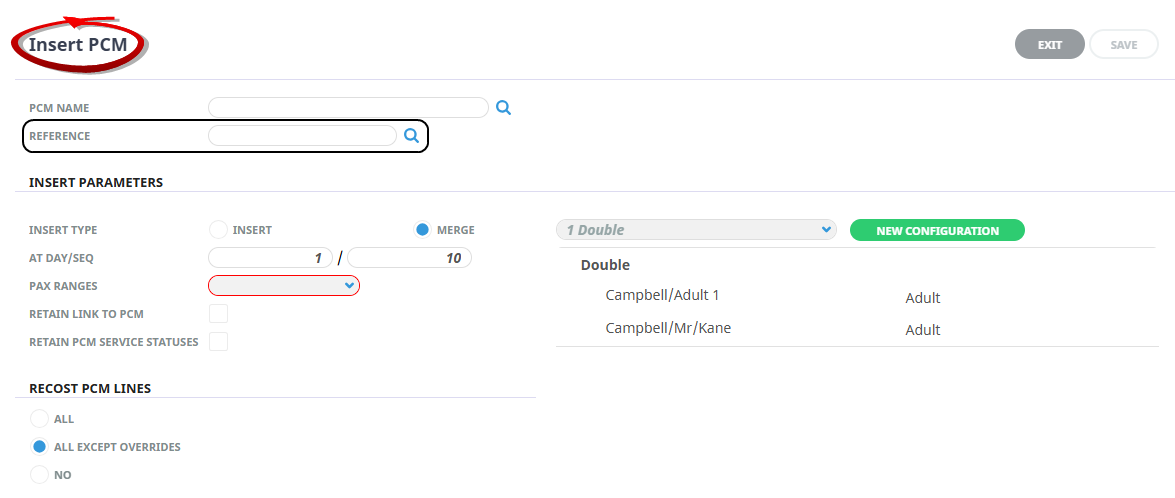
The PCM Management > Insert PCM feature now supports searching by PCM Reference number when adding a PCM to an FIT or Group booking, making it faster and easier to find the correct record.
Error Messages
We’ve improved the warning messages displayed in FITs when editing passenger type, date of birth, or passenger ages.
Consultants will now receive prompts:
-
When overrides exist on services, users will be asked whether they want to retain those overrides.
-
When a product rate has changed since the last calculation, users will be prompted to confirm whether the passenger updates should be applied.
System Setup
Messaging
We’ve introduced new a new messaging substitution code allowing you to display the number of nights between the booking travel date and the last service date. This code can now be used within both the supplier header and service line message sections, providing greater flexibility and clearer communication in your documentation.
NOTE: If messages are not consolidated by booking (for example, if consolidating by supplier instead), the last service date will be taken from the final service included in the selected grouping.
Message Substitution Code LSD:D (last service date: display number of nights).
Discount Commission Matrix
We’ve enhanced the Discount Commission Matrix to better support operators managing extensive date-range entries. The scroll bar now allows full, easy visibility of all date-range data.
Product
Copy Products
A new checkbox, Update Invoice Text 1, has been added to control how Invoice Text Line 1 is populated when Product Utilities > Copy Products feature is used.
When the tick box is:
-
Checked – Invoice Text Line 1 is updated using the new supplier’s default invoice text.
-
Unchecked – Invoice Text Line 1 is retained from the original supplier’s product being copied.
This provides clearer control over whether invoice text should be reset or carried over during product copy operations.

Allocations
Enhancements to Supplier Allocation editing ensure that allocation unit types refresh with the latest data whenever date filters are applied.
2.5.9.1 - Built 15th October 2025
Bookings & Quotes
Booking Change History
We have modified the Booking Change History records including recording:
-
the last date change for service amendments, providing clearer tracking of updates.
-
the user who performed the service deletion, improving audit ability and accountability.
FIT Booking Data Entry
The FIT Booking Pax Name Details screens now support using the Tab key to move smoothly to the next field, enhancing data entry efficiency and user experience.
Pick Up Drop Off Times
We have aligned the Pick Up Time and Drop Off Time formatting fields with FITs for Groups, PCMS when the TIME_FORMAT_DISPLAY INI Setting is configured.
Re-sequence Days
The INI setting SERVICE_AUTO_SEQUENCE, which automatically sequences PCM services based on pickup and drop-off times, now also applies to the Manage Days feature. Users can continue to manage days using the bulk sequence update, and with this setting enabled, the re-sequencing will prioritize the pickup time when determining order.
Financials
Standing Journals
The journal reference in Standing Journals is constructed using a 12-character reference and an 8-character sequence number, maintaining the total field length of 20 characters. This update allows flexibility in reference naming while preserving the existing format limits.
Invoice Selections
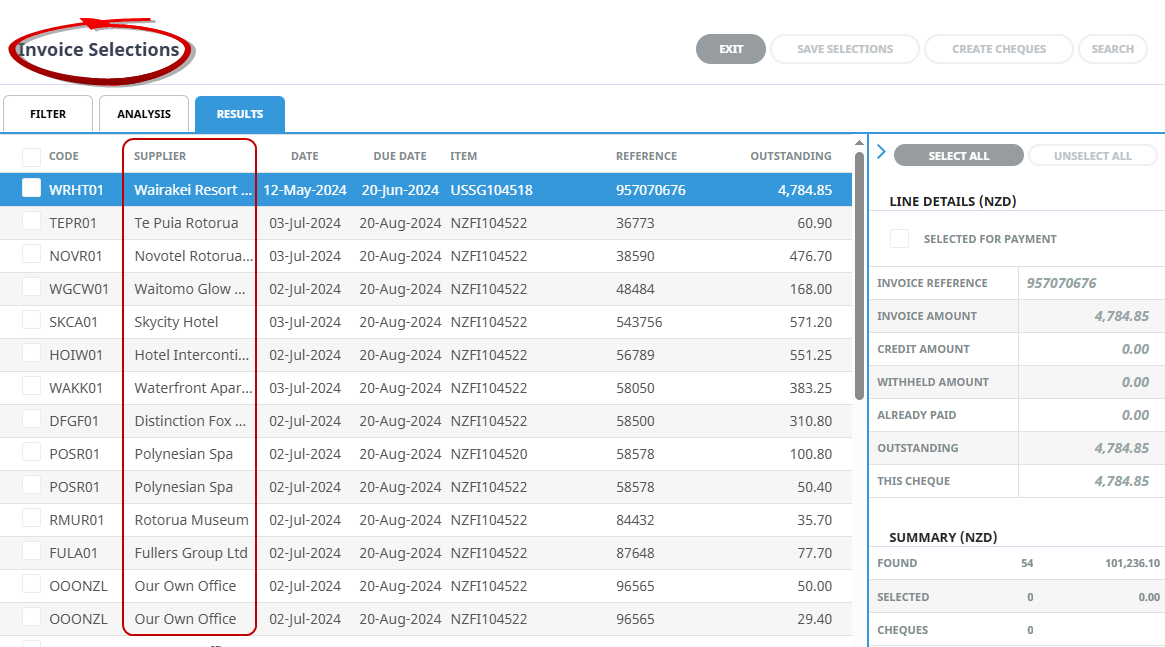
We have modified our financial screens to include column selections for Supplier Name for Accounts Payable. This enhancement allows your financial team to view the name of the Creditor when creating cheques instead of relying on knowledge of the creditors unique code.
Tour Window
We have enhanced Profit Percentage Calculations in the Tour Window, now applying rounding to 4 decimal places (4dp), improving accuracy and consistency in financial reporting.
Reporting
Custom Reporting
We have added 8 fields in our Custom Excel Reports. This enhancement supports improved reporting for organisations that store data in these fields, including the ability to report on local language data when alternative languages are used.
The fields now available are:
-
Booking Name Alias
-
Agent Name Local
-
Supplier Name Local
-
Product Description (Line 2)
-
Product Comment (Line 2)
-
Deposit Due Date
-
Final Payment Date
-
Deposit Amount
Messaging
Message Definitions
You can now choose to display additional columns in the Message Definition screen, including:
-
Created Date
-
Created By
-
Modified Date
-
Modified User
This enhancement allows for better tracking and management of large Message Definition lists.
Messaging Itinerary Sections
You can now include multiple Itinerary Line Blocks within an itinerary block to layer itinerary information for example:
<ITINERARY:START>
<ITINERARYLINE:START>
<ITINERARYLINE:END>
<ITINERARYLINE:START>
<ITINERARYLINE:END>
<ITINERARY:END>
Bar Code
Messaging code functionality has been extended to support the generation of (Code 39) Bar Codes. This allows messages to generate with a bar code which is commonly used for labelling and scanning applications.
UI & myEmail Settings
Spanish UI
The user interface is now fully translated into Spanish. All field names, buttons, and on-screen prompts will appear in Spanish when the language is selected from the home screen.
My Emails List
The INI Setting (MY_EMAILS_LIST) enables visibility of received emails on a users home page. Email lists can now be set up to include multiple filter settings. Administrators can configure a delimited list from the following filter options: Consultant, All, Branch, Department, Booking Analysis Codes 1-6, Unassigned or Errors.
Filter settings remain configurable for User ID or for All Users.
Operations
Bulk Update Booking
We’ve enhanced the Booking Status Update feature in Booking Operations to now support bulk updates for FITs, or both FITs and Groups. This improvement allows users to update the status of multiple bookings at once—whether they’re individual FIT bookings, group bookings, or a combination of both—saving time and reducing manual effort. The added flexibility helps streamline workflows, especially during high-volume periods or when handling itinerary changes, while also improving accuracy and efficiency.
Bulk Service Insert
We’ve introduced the Bulk Service Insert feature for FIT bookings, making it easier than ever to add services across multiple bookings at once. With this enhancement, users can now insert services into FITs or Groups—saving time and reducing repetitive tasks. To support this improvement, we’ve also updated the UI fields in the Bulk Service Insert screen to accommodate FIT bookings, ensuring a more intuitive and seamless experience. This update enhances operational efficiency and gives users greater flexibility when managing service additions across various booking types.
Bulk Service Status Update
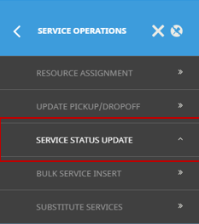
|
A new bulk update feature has been introduced, allowing users to change the status of multiple selected services in a single action. This Bulk Service Status Update enhancement streamlines the update process, significantly reducing the time and effort required to manage service statuses individually. For operational staff, this means improved efficiency, faster response times during high-volume updates, and reduced risk of manual errors—helping ensure smoother and more consistent service management. |
Resource Assignment
The behavior of Bulk Documentation for Resource Assignments has been aligned with previous versions of NX. The Bulk Messaging Service Date From/To fields now remain visible when switching between tabs in the new assignment window, ensuring a consistent and user-friendly experience.
2.5.8.1 - Built 20th August 2025
NI Settings
When the EDITABLETAX INI Setting is enabled, the system now recalculates applicable taxes accurately after services are moved between itineraries. This ensures tax values are correctly updated to reflect the new itinerary context, maintaining consistency and compliance.
Cancellation Fees
Enhanced Cancellation Fee restrictions now automatically disable editing of cancellation fee service values when the voucher is in a closed accounting period.
Transaction List Report - Tax Column
When exporting the Transaction List Report to CSV file, the Tax column header now dynamically displays either “Branch” or “Base” based on the report parameters selected.
Improved Field Navigation
System-wide enhancements now provide smoother navigation using the Tab key, with specific improvements to date and time selection fields for faster data entry.
Allocations
Visibility of the Release Date calendar now remains visible scrolling to the bottom of the allocation table within the Allocation ‘Days’ tab.
Accounting - Bulk Invoicing
Bulk invoicing now supports filtering by Last Service Date, and search results include a Last Service Date column selection for improved review.
2.5.7.1 - Built 23rd June 2025
Pick up time / day sequence feature
We’ve enhanced itinerary day sequence functionality for organisations who need to manage itinerary service line order based on pickup times (For FITs Groups and PCMs).
-
INI Setting - A new INI Setting has been included in this release allowing organisations who require day sequence numbering of booking and PCM services to order based on service line pickup time fields.
This setting applies to all users and enables the calculation of the day number based on the pickup time entered.
-
Pick up - Pickup date and time fields can now be used as a method for sequencing services based on pickup times.
-
Itinerary Column Selections - UI enhancements to FITs, Groups and PCM Itinerary service line screens. Organisations can now display pick up/drop off time column selection on the itinerary screen.
Click on the link to learn more How do I order itinerary service lines by pickup time?
PCM Markup/Commission
We have enabled new radio buttons in the Pax Range Details screen within PCMs. Markup and commission can now be set to apply to:
-
This Pax Range (default setting)
-
All Pax Ranges
-
Pax ranges with same values
A new checkbox in the Supplements screen also identifies if the markup and commission is to ‘Apply To All Supplements’.
Click on the link to learn more Can I apply set markup and commission to all Pax?
Allocations
Enhanced format entry for allocation release fields. This feature provides the ability to enter and manage supplier allotment release periods by a release date.
Click on the link to learn more How do I enter a release date in allocations?
PCM Bulk Supplier Messaging
We’ve included the ability to update PCM service line statuses when generating a bulk PCM Supplier message.
Error Messages
Improved error messaging for financial errors. Users are now provided with a message which identifies if the Agent or Supplier does not have the currency attached.
Messaging Translations
Messaging now supports translatable ‘Notes’ for supplier connectivity services. To display translations in generated messages, Notes must be formatted in text-based XML and have a corresponding entry in the language translation table for each required language.
Copy PCM
The Copy PCM feature now lets users assign a new Agent to the Copied PCM if the INI Setting DEFAULT_BRANCH & DEFAULT_DEPT are not configured.
MyEmail Tab
We've improved our MyEmail tab on the Home screen interface to make selectable links easier to identify. A hand-hover cursor now appears over the booking hyperlink, clearly indicating where users can click to open the booking.
Resource Assignments
We’ve enhanced the date filters in the Resource Assignment UI. If an invalid date selection is made, a red highlight will appear around the affected field to clearly inform the user of the error.
Return to Results Screen
After processing bulk operations users are now returned to the results screen with original filters selected for PCM Operations for the following tasks:
-
Bulk Service Substitution
-
Bulk Service Insert
-
Bulk Update PCM Status
2.5.6.1 - Built 12th May 2025
PCM Operations Menu
We have added the ability to perform bulk operational features for PCMs, including a new Operations menu item, called PCM Operations with sub menu items for the following tasks:
|
|
|
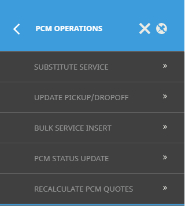
Substitute Services
The Substitute Service feature enables users to quickly replace services across multiple Pre-Costed Modules (PCMs) in a single action. This functionality streamlines the process of updating itineraries, allowing for efficient service replacements without the need to individually edit each PCM.
We have also enhanced the PCM Quotes and PCM Package Itinerary features, adding the ability to substitute a services within the PCM Service Details screen. Now services can be substituted within an open PCM.
Code Setup now includes the following INI Settings:
-
GB_RETAIN_VCH_DEFAULT
-
PCM_RETAIN_VCH_DEFAULT
Allowing you to configure a default (Yes or No) setting for retaining the voucher text during a service substitution for Groups or PCMs.
Update Pick up/Drop Off
The new Update for Pick Up/Drop Off feature allows users to efficiently update pickup and drop-off details, as well as remarks, across multiple Pre-Costed Modules (PCMs) in one process. This update enables users to make logistical changes or update relevant notes for multiple PCMs simultaneously, saving time and ensuring consistency across selected PCMs.
Bulk Service Insert
We've introduced a Bulk Service Insert feature, available from the Operations menu in both Booking Operations and PCM Operations.
The Bulk Service Insert feature allows users to add a service to multiple PCMs in a single, streamlined operation. Providing an efficient way to manage services across multiple PCMs.
PCM Status Update
The PCM Status Update feature allows users to update the status of multiple Pre-Costed Modules (PCMs) in bulk. This feature simplifies the process of managing statuses, enabling operators to update statuses across several PCMs with a single action. Whether confirming PCM Pricing, placing on hold, or marking them as cancelled, this feature enhances workflow efficiency and ensures consistent status management across all selected PCMs.
Recalculate PCM Quotes
We have moved this feature from Booking Operations to the new dedicated PCM Operations Menu.
Bulk Documentation
You can now send message in bulk to both Agents and Suppliers directly from a new Bulk Documentation - PCM Quotes menu.
The Bulk Documentation Menu has been updated with two new sub-menus, Bookings and PCM Quotes.
-
Under Bookings, you’ll find our existing features for Supplier Messaging, Agent Messaging and Vouchers.
-
Under PCM Quotes, you’ll now find the new Supplier Messaging and Agent Messaging features designed for PCM workflows.
Bulk Copy PCMs
We’ve added a new Bulk Copy option to the Operation menu in both PCM Quotes and PCM Packages.
This feature enables users to copy a PCM to multiple base dates in a single bulk process.
To avoid a PCM Name duplication, a sequence number is automatically appended to the PCM Name and PCM Name Alias fields for each copied version.
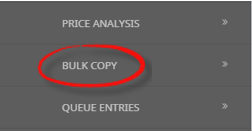
PCM Price Analysis
We’ve enhanced the PCM Price Analysis feature to include a bulk copy PCM process when price variations are recorded for differing base dates. This feature enables users to Copy a PCM to multiple base dates in a single bulk process. The new Create PCM’s button populates PCMs with dates that were identified in the analysis.
To avoid a PCM Name duplication, a sequence number is automatically appended to the PCM Name and PCM Name Alias fields for each copied version.
Retain PCM Status
When inserting PCMs into FIT or Group Bookings, you now have the option to Retain PCM Service Statuses. Selecting this option on PCM Insert ensures that services within the PCM are added into the booking with therir origional status preserved.
Booking Status Update
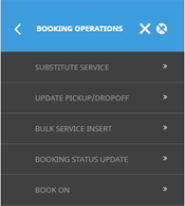
We’ve introduced a new feature within the Booking Operations menu called Booking Status Update. This feature allows operators to update the Booking Status for multiple Groups bookings in a bulk update. Filters can also be saved for repeatable tasks.
Bulk Insert Service
|
|
A new Bulk Service Insert feature from Booking Operations allows users to add a service to multiple Group Bookings in a single, streamlined operation. Providing an efficient way to manage services across multiple Bookings. |
Bulk Copy Bookings
We’ve added a new Bulk Copy option to the Operation and Accounts menu in FITS and Groups.
This feature enables users to copy an open Booking to multiple Travel dates in a single bulk process.
To avoid a Booking Name duplication, a sequence number is automatically appended to the Booking Name and Booking Name Alias fields for each copied version.
Email Import
We’ve enhanced the existing email import features providing the ability to import emails into Groups Bookings. The email management page is also available to assign unassigned emails to Groups bookings, and there is the ability for consultants to view and open Groups bookings with received emails from ‘My Emails’ on their home page.
PNR Service Line
Updating Imported PNR Service lines is now possible for the following fields: Status, Pax Type and Ticket Type.
External Service Messaging Settings
There are two existing locations for Tourplan to define an External Service Message format configuration.
-
The first is in Code Setup – Message Type settings which works within the message format service section detailing a format for an external Message Type..
-
The second is within INI Settings ES_MESSAGE_FORMAT.
This patch release ensures External Services use the Message Format defined in Code Setup before defaulting to the INI Setting configuration.
Rates enhancements
We’ve improved rate calculations when stay-pay promotions span across rate seasons and FOC nights are included. This enhancement ensures users see consistent pricing throughout the booking process.
2.5.5.1 - Internal Release
Internal release for development testing
2.5.4.1 - Built 14th March 2025
Rate Maintenance
Copy Rates, when the Copy Rates function is executed, ‘Rate Text 2’ and ‘Rate Name 2’ fields are now successfully copied to the new rate.
Grid Search
The Grid Search feature has been enhanced to support the Enter key as a shortcut for quickly finding the next result.
Itinerary - FITs, Groups, PCM Quotes
The itinerary screen in FITs, Groups and PCM Quotes now has a grid search feature added.

PCM Calculation
We have enhanced PCM calculations for single supplement in staff-only services when extras are not selected.
INI Settings
• TARRIFFWRITERDISCOUNT INI Setting has been removed.
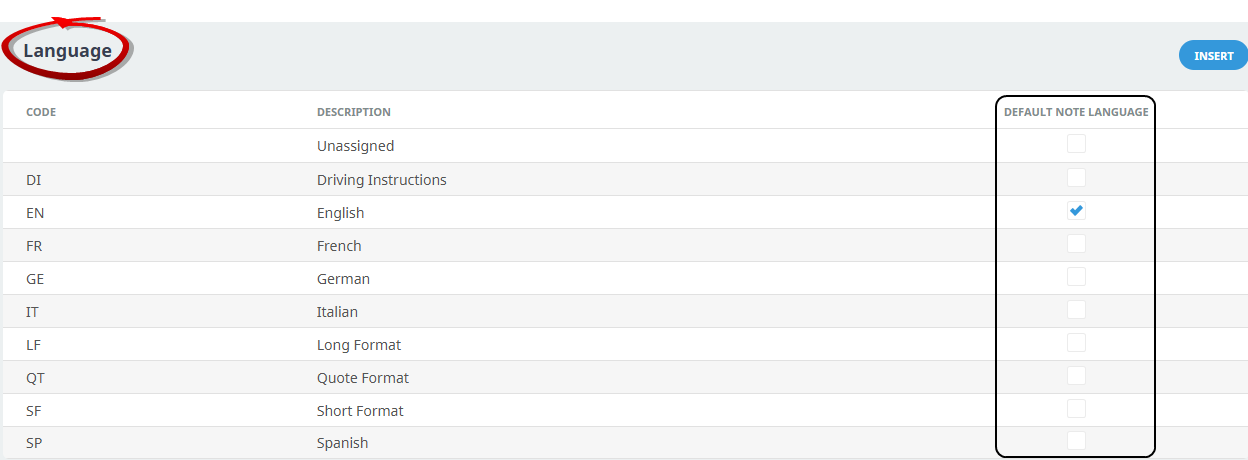
• The DEFAULT_NOTE_LANGUAGE INI Setting has been removed. This functionality is now managed through the Code Setup ‘Language’ screen, where a default language can be assigned for notes.
If your organisation uses this INI Setting, the upgrade process will transfer the previously assigned language as the Default Note Language, and maintenance of default note languages will be performed within the Code Setup Language screen.
Allocations
A screen enhancement for Supplier Setup > Allocations > Move Allocation, now provides visibility of ‘Apply To’ ‘Saturday’ and ‘Sunday’ labels and corresponding checkboxes on screen.
Alias Field Import Group Rooms Lists
There is now the ability to import Alias Name fields from a CSV file in the Rooming List Import process for Group Bookings including the following fields:
| Name Field | CSV Format |
|---|---|
| Title Alias | TitleAlias |
| Surname Alias | SurnameAlias |
| Forename Alias | ForenameAlias |
These ‘aliases’ can now be easily mapped and imported, streamlining the process and ensuring accurate name data management for group bookings.
Reports
-
Voucher List column in the Voucher Audit Trail report has been widened to allow 9 digits plus a hundreds separator.
-
The Transaction Period and Age Period columns in the Transaction List Reports have been widened to better accommodate the date format. This adjustment ensures that the data is displayed clearly without the need for wrapping when output to PDF.
-
We’ve improved the performance of Product Report generation, specifically when filters are applied without a supplier code. This enhancement results in faster product report generation
-
We’ve enhanced the printing feature for internet-connected printers, resulting in improved performance and faster report generation.
Japanese UI
Error messages have been improved to display translated Japanese text when users have selected Japanese as their preferred UI language. This ensures a more localized experience for Japanese-speaking users.
Screen Loading
We’ve improved application loading times for PCMs, FITs, and the Home Page. For PCMs and FITs this was a performance improvement for the service line details.
Email Import
The Email import feature now offers:
-
improved email filtering options
-
the ability to manually assign emails to agents, suppliers and bookings
-
an email forward feature, to forward unassigned emails to another email address
2.5.3.1 - Built 2nd December 2024
PCM Messaging Substitution Codes
Substitution Code enhancements enable more dynamic and detailed messaging by
-
incorporating quantity-based and free-of-charge extras into PCM messages.
Please see attached example for PCM messaging codes.
-
Adding header-level pax range parameters for PCM Mark-up PCM, PCM Margin, and PCM Commission substitution codes (MUPPC, MARPC, COMPC).
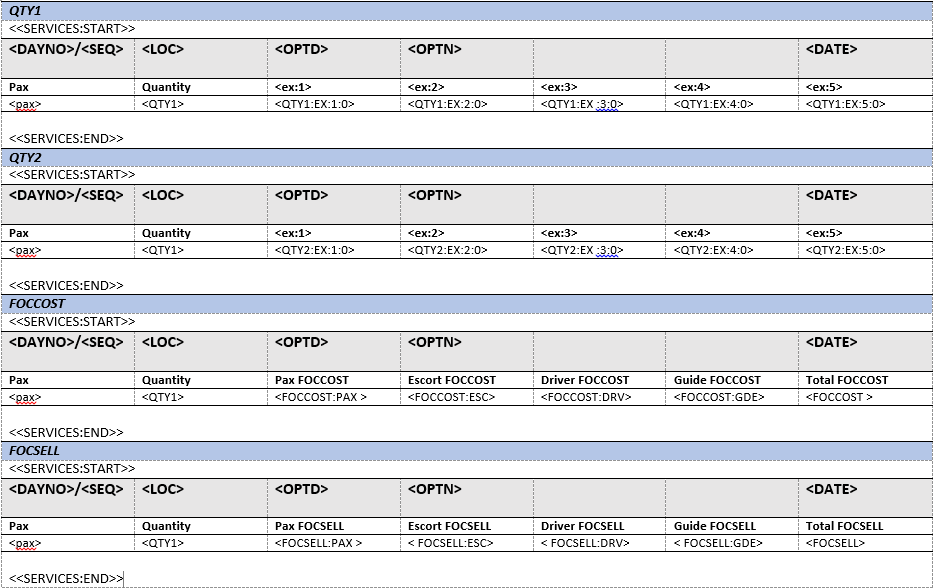
This enhancement allows users to define specific passenger range parameters directly at the header level, providing more flexibility. The new substitution codes ensure that mark-up, margin, and commission calculations can be tailored to different passenger group sizes.
Warning Messages
We’ve enhanced our warning messages
for bookings associated with deleted PCM/Package entries.
-
When a booking includes a deleted PCM, the system now displays a clearer and more informative warning: "Warning: The booking was connected to a PCM/Package that has been deleted. You should recalculate the booking."
-
When attempting to change a passenger's age to one that is not allowed by the service rate policy. A warning message now provides more specific details, including the Service Line Sequence Number, the Service Code, Supplier and Product Code, and the Rate Policy ID.
Discount Commission Markup Matrix
The latest enhancements to the Discount/Commission/Markup Matrix screen includes several user-friendly updates.
The default width of the ‘sequence’ column has been adjusted for better readability.
-
The column previously labelled ‘Value’ has been renamed to ‘Amount,’ and the percentage symbol is removed to accommodate fixed price rules.
-
‘Amount’ column is configurable for values up to 8 decimal places.
-
A new ‘Amount Type’ column has also been introduced to clearly display whether a rule is based on a percentage or fixed price.
Email Import
The email import Agent Reference match rule has been updated to allow between 5 and 60 non-blank characters (including dashes and slashes), if used within the booking header Agent Reference field. This enhancement provides greater flexibility in matching Agent References during email import auto-assign process, and ensures compatibility with a wider range of reference formats.
Product Search
Agent Internet Access and Supplier Internet Access columns are now enabled when viewing product search results – users can easily see if products are internet enabled
Email Account
Several new email settings have been added to the Code Setup > Email Account configuration to align with existing client email functionality:
-
Default Email: Set a default email account for outgoing emails for Tourplan to send from
-
Send and From Match: Enable the option to ensure that the “Send” email address matches the “From” address, improving email authenticity and security.
-
Allow CC and BCC: New settings now allow users to enable or disable the use of CC (Carbon Copy) and BCC (Blind Carbon Copy) fields in email communications, providing greater control over email distribution.
-
Allow Attachment of DOCX: Users can now allow or disallow the attachment of DOCX files to emails.
These additions provide greater customization option for users, ensuring that email functionality aligns with your operational needs.
Japanese UI
We’ve improved the translation of our Japanese UI.
AP & AR Transactions
More column selections are now available in the Tour Window; Supplier and Agent Name columns are available AP and AR transactions.
accountConnect GetDebtor ‘Address’ and GetCreditor ‘Address’ requests now returns the physical address information for Agents and Suppliers, and we’ve added ‘localAddresses’ to request the local mailing address information
2.5.2.1 - Built 16th October 2024
Insert Allocation
We have applied sticky header features to the Insert Allocation modal allowing the ‘Service’ options to include, and the ‘Services Included’ column heading to remain visible when scrolling.
Messaging Substitution Code
New messaging substitution codes include:
-
PAXID now provides a solution for organisations who wish to output the PAX CRM Customer ID on their messages. This code can be used within the names section of booking messages.
-
Price substitution codes can now utilise a parameter to round prices when booking values use currency exchange conversions. You can now apply the :RE parameter to your pricing substitution code to round converted values.
-
Agent & Supplier User Defined Text fields UDT 11-20 substitution codes have been added for E-Invoice.
Transaction Columns
We have enhanced the Debtor and Creditor Transaction screen by adding a new column selection ‘Branch’.
Product Search
We’ve introduced a new search feature on the Insert Service Results and Product Search Results modals. A blue magnifying glass icon is now available, allowing users to search all fields, including fields not visible on screen. This enhancement makes it easier to find specific product quickly and efficiently.
PCM Branch & Department
PCM search results pages now includes column selections for Branch and Department columns. This feature is available for the following applications:
-
PCM Quotes > PCM Search
-
PCM Packages > PCM Search
-
FITs > Insert PCM > PCM Search & PCM Management
-
Groups > Insert PCM > PCM Search & PCM Management
Bulk Recalculation
We’ve added a new feature to the Bulk Recalculation screen. Now you can use a scrollbar to view all the results on the summary modal.
UI Languages
Our alternative language UI field labels have been updated for Spanish, French, Chinese, and Japanese languages.
accountConnect
(Professional & Enterprise Editions) accountConnect our Accounting API can now return:
-
Address information and User Defined Text fields (1-20) for Debtors and Creditors
-
Booking Reference and Voucher Numbers for transaction lines where available
Plus we have enhanced the feature to allow the creation of AR receipts without unallocated cash.
2.5.1.1 - Built September 2024
UI Changes
Column Headings
A system wide enhancement provides visible column headings when the screen scroll feature is used. Column headings remain ‘stuck’ and always visible on screen.
Search Features Improved search ability for large tables within UI applications. A search icon (blue magnifying glass) is added for users to input keywords to search all rows within the table (not just those visible on screen).
Multi Language UI Japanese
Japanese UI field labels are now available to view the Tourplan NX UI in Japanese.
Product Utilities
Split (Bulk) Rates
Rate Maintenance provides a feature to split rates for multiple product rates. A selected date is entered for the system to split existing rate periods forming two date ranges. Filters are applied to update multiple rates at once.
Copy Multiple Products
There is a new menu option within Product Utilities called Product Maintenance. A new feature ‘Copy Products’ allows users to copy multiple products from one supplier to another. The ‘Product Maintenance’ menu now includes Product Notes.
Tax Enhancements
Rate Maintenance Tax Update
Tax Update Rate Maintenance enhancements provide the ability to update an applied tax code for multiple products in a bulk process. Existing product rates can be updated using the Modify Rates feature allowing users to replace an old tax code with a new tax code.
Filtering by tax code is available for the following Product Utilities features: Duplicate Rates, Extend Rates, Modify Rates, Copy Rates, and Split Rates.
Cost Only Tax
Tax on cost only A new ‘Apply to Cost Only’ tax setting allows organisations to apply tax on product cost values. This addition provides a solution for scenarios where tax calculations need to be based on the nett cost of products.
Click here to learn more about the differing cost/sell tax rates feature.
Branch Specific Taxes
Tax codes can now be associated with specific branches, allowing tax variations based on the booking branch or PCM branch. This enhancement is useful for operators who need to manage different tax rates or tax requirements depending on the branch of the booking.
Click here to learn more about the Tax treatment by booking branch feature.
Cost Sell Override
A new INI Setting controls if product sell price automatically updates when a cost price is manually overridden in the booking cost screen.
Warning: if operators choose to implement this feature and configure the sell price to not automatically update; booking margins may be affected and there is a possible risk of selling the product for less than the cost price.
PCM Branch & Department
Organisation that previously utilised Branch & Department codes in FITs or Groups can now apply Branch/Department based calculations to PCM Quotes and PCM Packages.
PCM Reference Numbers
Numerical sequential references are applied to PCM Quotes and PCM Packages with the upgrade to version 2.5. This new PCM reference number assists with tracking or retrieving PCMs.
Standalone reference numbers follow an independent sequence for PCMs, they are not designed to be transferable with FITs or Groups booking references.
Click here to learn more about the PCM Reference feature.
Cost Sell Override
A new INI Setting controls if product sell price automatically updates when a cost price is manually overridden in the booking cost screen.
Warning: if operators choose to implement this feature and configure the sell price to not automatically update; booking margins may be affected and there is a possible risk of selling the product for less than the cost price.
Non-Accommodation Enhancements
Non Accommodation Packages
A new ‘Package Non Accommodation’ service category is now available. Providing non-accommodation pricing for packages, including the ability to split the costs for a group of passengers when the package is entered into a booking.
Note:
-
The services within the package must be non-accommodation services (ie non room based pricing).
Click here to learn more about the Package Non-Accommodation feature.
Minimum & Maximum Passenger Conditions
Non-Accommodation product policies now allow Minimum/Maximum pax count conditions. New Pax Policy fields are included providing further booking conditions when non-accommodation suppliers have a minimum number of passengers required to book the service, or when the product cannot be sold due to exceeding the maximum number of passengers per booking.
Policy Tab
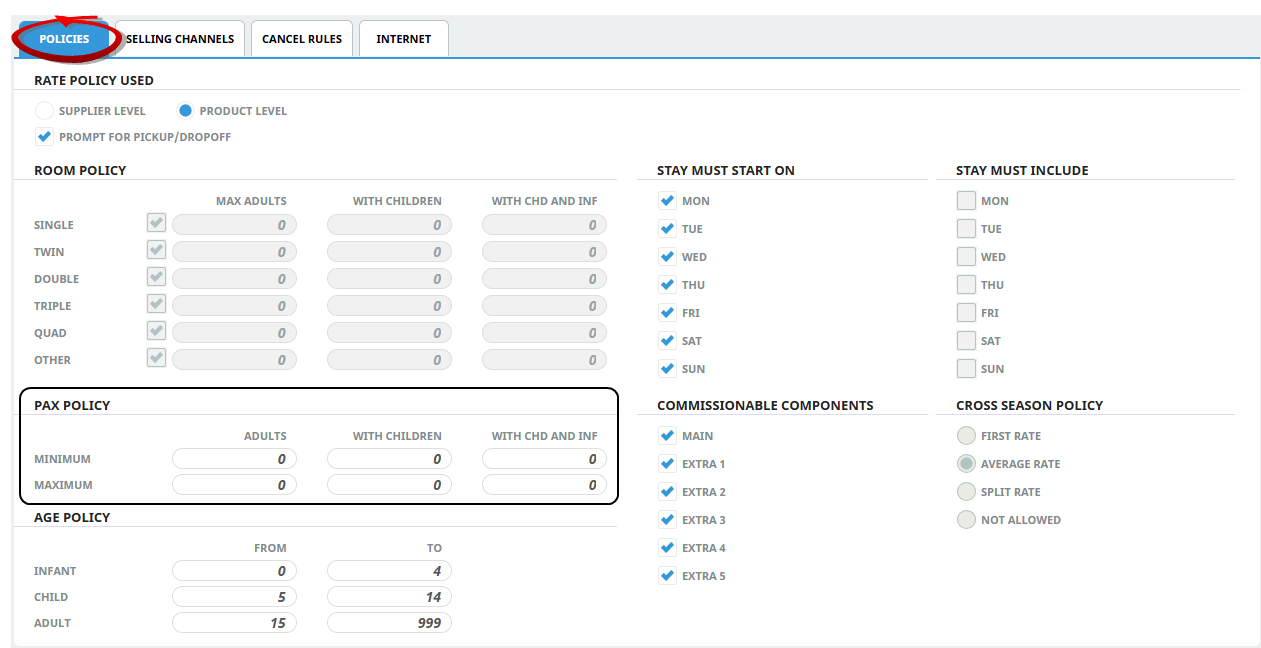
Click here to learn more about the Min/Max pax policy feature
Connections
Product/Supplier External Mapping
Multiple external supplier connections can be applied to a single supplier. A new connection menu within the Product or Supplier Menu provides a connection modal to define external service mapping information without using Notes.
Product Connections
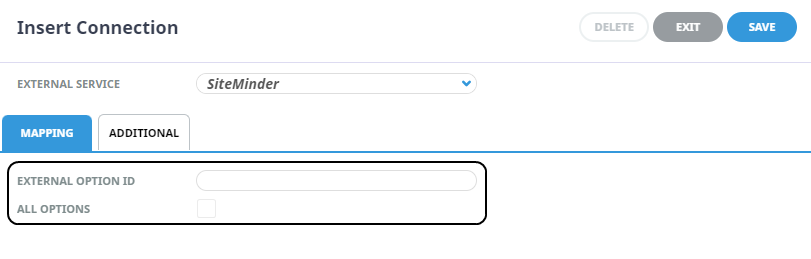
Supplier Connections
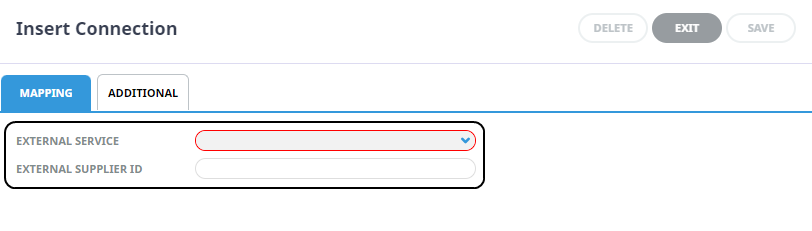
NOTE: It is important to note that existing setup and mapping methods using 'Notes' are still supported.
Click here on the links to learn more:
Endpoint Definitions
A new menu item is included in the Code Setup > System Menu.
Warning: We suggest organisations review their Users Security Settings to ensure unauthorised users cannot edit this information. If connection details are changed the supplier connection will fail.
Pax Name Changes
You can now update certain passenger details like passenger names, via an update booking request through HostConnect. Note: passenger details can be updated if there is no impact service line costs with the requested change, and if the passenger name saved within the NX Pax CRM is not a re-usable name.
Commission Matrix Rounding
We have refined how matrix commissions are calculated during a product search to apply at a per component level rather than per service line, this functionality is more in line with the final booked service costing.
Accounting API
A new feature called accountConnect provides the ability for clients to share accounts receivable and accounts payable transactions to third party accounting systems via an API.
Whilst Tourplan provides the ability to manage all accounting and finance functions within NX there have been a number of recent scenarios requiring a solution for extracting accounting information from Tourplan to third party accounting systems, for e/billing or government taxation reporting requirements.
Click here to learn more about the accountConnect feature.
Email Import
This feature is designed to enhance the existing email send from booking function. Email features now include the ability to import emails from one or more nominated email accounts. A new email management page is also available to assign unassigned emails to bookings, and there is the ability for consultants to view and open bookings with received emails from ‘My Emails’ on their home page.
Click here to learn more about the Email Import feature.