
Date Dependent Text
Can I configure date dependent text within a note?
Yes, Tourplan allows users to specify which not text is included within messages based on the date. This means users can choose which note text to include or exclude for a specific date range, making it easy to customise messages to meet their specific requirements.
This document explains...
-
How to make not text date range specific
-
How to apply date sensitive tags to notes
-
The requirements and imitations of date sensitive tags.
Overview
Using <Applies dd-mmm-yyyy to dd-mmm-yyyy> and <Applies:end> tags will include or exclude date-sensitive note text. When the travel or service date falls within the date range identified by the tags, the text inside the tags will be included or excluded accordingly.
Below is a Product Supplier Note
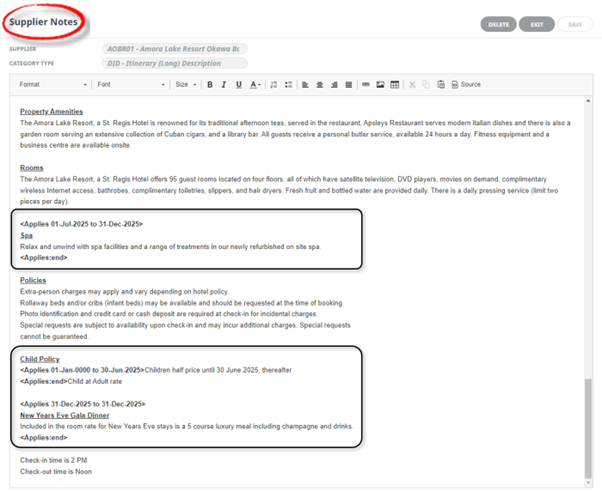
The example shows 3 variations:
- The first date sensitive note text (Spa) will be output for travel or service date 1 July 2025 until 31 December 2025.
- The second date sensitive note text (Child Policy) will be output for all travel or service dates up to 30 June 2025.
- The third date sensitive note text (Gala Dinner) will only be output if the travel or service date falls on 31 December 2025.
Important
In order for the <Applies dd-mmm-yyyy to dd-mmm-yyyy> and <Applies:end> tags to function properly, the syntax must be precise. If the syntax is incorrect, the text and tags will be displayed. The display of date-sensitive note text is determined by the placement of the note substitution code.
If the note substitution code is placed in the header, itinerary header, itinerary tail, or tail, the travel date will be used to determine when to display the date-sensitive note text. However, if the note substitution code is placed in the lines section, the service date will be used instead.
Do not use date dependant applies tags within a note for the following message types:
-
Invoice
-
Remittance
-
Journal
-
Statement
-
EFT
hostConnect/webConnect
-
When retrieving notes via hostConnect, the date sensitivity tags will be displayed in the XML response. Your web developer should be able to filter which text to display from there.
-
The date dependent text within notes works in the webConnect / Option Info and Supplier Info sections.
-
Systems show the note contents within the date tag according to the service date user search in the webConnect / Online Booking section.