Multi Language Definitions
The Tourplan messaging application allows the creation and storage of document templates, which can be used to generate messages and documents for agents, and suppliers. Depending on the needs of the organisation, these message templates can be configured to use multiple languages.
This article will explain…
-
The multi language options in Tourplan NX.
-
Where to find further information.
Overview
The requirements for Tourplan NX to create a multi language message function, include:
-
Message Definitions (templates).
-
Debtor and Supplier Language Settings.
-
Multi Language Fields.
-
Multi Language Notes.
-
Itinerary Segments.
-
Language Translation Table.
-
Message Definitions
NOTE: Before the required language option can be selected it must first be set up within Code Setup > Messaging > Language.
Message Definitions (templates) can be defined in multiple languages, each template has a specified language option that allows the use of the same definition name and code for multiple languages.
Multi language message definitions allow the use of a combination of hard coded language text, and messaging substitution codes to pull required information from the system when the message is generated.
Click on the link for more information on Message Definitions.
Agent and Supplier Language
NOTE: Language specific message templates must have been configured by your organisation.
To generate a message in an alternative language, specify a language in the debtor and/or creditor analysis tab; this language determines the message definition (language template) to use to send to that agent or supplier.
Click on the link for more information Debtors Analysis Tab (Language Field)
Click on the link for more information Creditors Analysis Tab (Language Field)
Multi Language Fields
Tourplan allows multi language text storage for Notes, Itinerary Segments, and Word to Word translations in a Language Translation Table in Code Setup.
The information your organisation wishes to generate on an alternative language message will determine if one or all multi language text storage options are required.
Start by looking at your messages, what information do you need to translate, firstly where is it stored in Tourplan, what translation field options are there for this field.
Notes and Itinerary Segments
Message definitions can be formatted to include booking, supplier, product, and agent notes. These notes can all be defined in multiple languages. Itinerary segments also have this capability. Organisations will need to assign a language option to the note and enter the translated text for each language. The note substitution code will need to be used within the message template to pull the required language text when the message is generated.
For more information on Notes and Itinerary Segments click on the links below
Language Translation Table
Tourplan field information (words or phrases) can be configured with alternative language text. The language translation table lets you define alternative language options for words or phrases. For example, if a Service Extra defined as Cooked Breakfast is being used in a message, an alternative language option for Cooked Breakfast can be set up.

Another common use for the Language Translation table is days of the week or months of the year. This allows a message to be coded using the same substitution code, <DAY> for all language options. If the day of the week has a language translation available, the message will be generated using the selected language text.
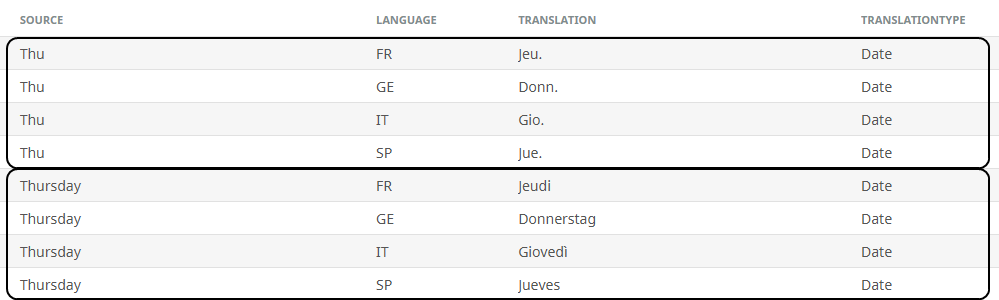
For more information click on the link Language Translation
Supplier & Product Translations
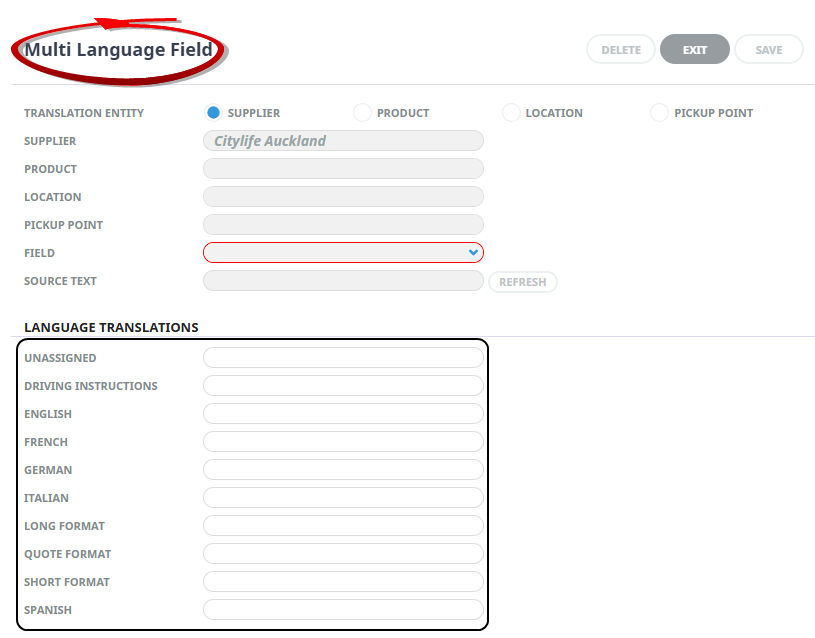
Tourplan allows multi language text storage for Supplier and Product information including; Supplier Address, Locations, Pickup Information, Product Name. The information your organisation wishes to generate on an alternative language message will determine if one or all multi language text storage options are required. It means if you use a substitution code, and you are using an alternative language message (definition), and you have language information defined in the Supplier Multi Language Translation table, the translated text will apply in the generated message
Click on the link for more information Add Language Translations.