
Loading interactive content…
Enable a Creditors INI Setting
-
From the Home menu, select
 Home > System > Code Setup.
- Click the Home menu to expand it:

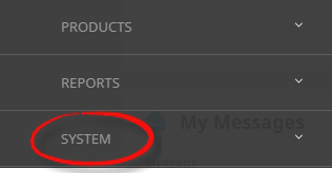
- Click the System menu option to expand it:

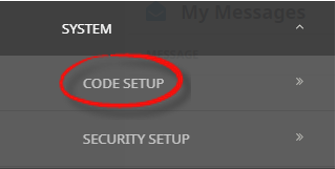
- Click Code Setup to go to the Code Setup menu:

- Click the Home menu to expand it:
-
From the Code Setup menu, selectINI Settings > Creditors.
- Click the Code Setup menu to expand it:

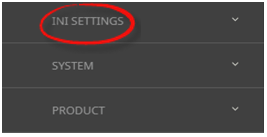
- Click INI Settings to expand the INI Settings menu:

- Click Creditors to open the Creditors INI Settings screen:

- Click the Code Setup menu to expand it:
-
On theCreditors screen, if the INI Setting that you want is not already in the list, click Insert.

-
In theCreditors screen, select a Setting Name and User ID.
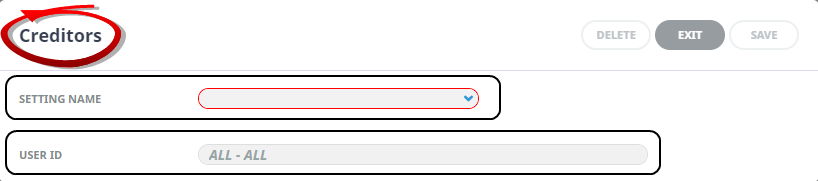
-
ClickSave to keep the changes.

-
ClickExit to discard any changes.



Available Creditor INI Settings
INI Settings can be enabled for all users or (where permitted) for specific users.
APADDRESSnLABEL (5 Fields) (All Users)
These 5 settings can be used to label the physical address fields in Creditor set up > Details tab - e.g. Street, Suburb, and Town/City etc.
APADDRESSnLOCALLABEL (5 Fields) (All Users)
These 5 settings can be used to label the local physical address fields in Creditor setup > Details tab - e.g. Street, Suburb, and Town/City etc.
APBANKACCOUNTVALIDATE (All Users) (User Special)
Setting this to 'Base11' forces a base 11 validation on the bank account entered. (Base11/None)
APCLOSEDPERIOD (All Users)
The Creditors ledger closed accounting period.
NOTE: This value is set when the system is installed and should ONLY be altered on the basis of support advice. Altering this setting can result in creditor’s balances being incorrect.
APCURRENTPERIOD (All Users)
The Creditors ledger current accounting period.
NOTE: This value is set when the system is installed and should ONLY be altered on the basis of support advice. Altering this setting can result in creditor’s balances being incorrect.
APMAILINGADDRESSnLABEL (5 Fields) (All Users)
These 5 settings can be used to label the mailing address fields in Creditor set up > Details tab - e.g., P.O. Box, Suburb, and City etc.
APMAILINGADDRESSnLOCALLABEL (5 Fields) (All Users)
These 5 settings can be used to label the local mailing address fields in Creditor set up > Details tab - e.g., P.O. Box, Suburb, and City etc.
APUDLABELn (20 Fields) (All Users)
Used to label the 20 User Defined text fields which then display in the Creditors > Details Tab.
AP_DEFAULT_CLOSE_VCH (All or Per User)
Enables the default value to be set for the checkbox 'Close Voucher' when paying creditors. (Y/N).
AP_EXCHANGE_RATES (All Users)
This setting determines whether the exchange rate used in foreign currency creditor payments is based on the 'Transaction Date' or 'Booking Date'.
AP_INVOICE_AGE (All Users)
The value in this setting determines how creditor’s invoices will age. Available options are by: 'Invoice Date' or 'Pay Due Date'
NOTE: This value is set after ageing options have been discussed with the user company. It should ONLY be altered on the basis of support advice.
AP_INVOICE_IMPORTS (All Users)
This setting stipulates what invoice file formats will be will be permitted for 'Supplier Invoice Imports'. File formats permitted are: 'WEX' or 'STD'.
AP_INVOICE_POSTING (All Users)
The value in this setting determines when the expense is to be recognised. The period options available are: 'Age', 'Invoice', 'Last Service Date', 'Travel Date '..
NOTE: This value is set after expense recognition options have been discussed with the user company. It should ONLY be altered on the basis of support advice.
AP_OVER_INVOICED_LEVEL (All Users)
The minimum User Security Level for users authorised to allow Payables Over-Payments. Used in conjunction with AP_OVER_INVOICED_PW below.
AP_OVER_INVOICED_PW (All Users)
The password required to allow Payables Over-Payments. Used in conjunction with AP_OVER_INVOICED_LEVEL above.
AP_SET_SAME_PAYDUE - (All or Per User)
Setting this forces a common pay due throughout all lines in an AP transaction. Based on the Payment Due date for the creditor, the options available are: No, Earliest, or Latest.
- No - maintain the calculated pay due date.
- Earliest - base the payment due date on the earliest calculated pay due date.
- Latest - base the payment due date on the latest calculated pay due date.
Note: The date can be overridden.
AP_TAX_ANALYSIS (All Users)
Tax can be analysed by using one of the product analysis fields. The value for this INI Setting is a numeric value 1-6, indicating which of the Product Analysis fields is being used for the tax analysis. (This INI Setting is used for general creditor invoice lines that are not linked to a service)
AP_TAX_ANALYSIS_VALUE (All Users)
The Tax Code which is in the Product Analysis field in AP_TAX_ANALYSIS (above)
BSP_DISCREPANCY_AC (All Users)
The GL Expense Accounts for Tickets processed through BSP.
BSP_DISCREPANCY_BR (All Users)
The GL Expense Branch for Tickets processed through BSP.
BSP_DISCREPANCY_DP (All Users)
The GL Expense Department for Tickets processed through BSP.
DEFAULT_PAYMENT_TYPE (All or Per User)
This setting can be used to determine the default cheque payment type to be used when creating creditor cheques.