
Loading interactive content…
Enable a Debtors INI Setting
-
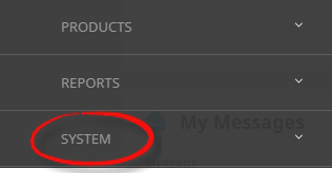
From the Home menu, select
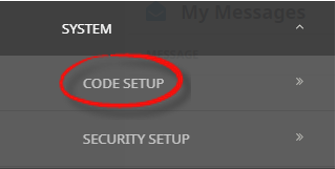
 Home > System > Code Setup.
- Click the Home menu to expand it:

- Click the System menu option to expand it:

- Click Code Setup to go to the Code Setup menu:

- Click the Home menu to expand it:
-
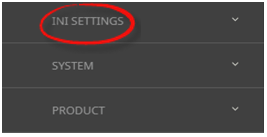
From the Code Setup menu, selectINI Settings > Debtors.
- Click the Code Setup menu to expand it:

- Click INI Settings to expand the INI Settings menu:

- Click Debtors to open the Debtors INI Settings screen:

- Click the Code Setup menu to expand it:
-
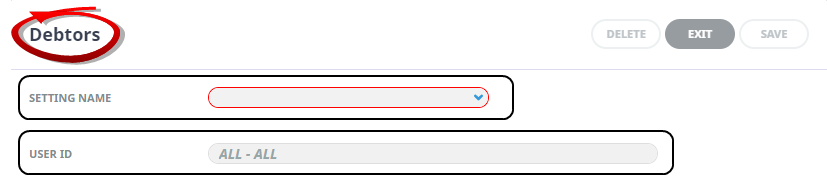
On theDebtors screen, if the INI Setting that you want is not already in the list, click Insert.

-
In theDebtors screen, select a Setting Name and User ID.
-
ClickSave to keep the changes.

-
ClickExit to discard any changes.



Available Debtors INI Settings
INI Settings can be enabled for all users or (where permitted) for specific users.
ARADDRESSnLABEL (5 Fields) (All Users)
These 5 settings can be used to label the physical address fields in Debtor set up > Details tab - e.g. Street, Suburb, and Town/City etc.
ARADDRESSnLOCALLABEL (5 Fields) (All Users)
These 5 settings can be used to label the local physical address fields in Debtor set up > Details tab - e.g. Street, Suburb, and Town/City etc.
ARCLOSEDPERIOD (All Users)
The Debtors ledger closed accounting period.
NOTE: This value is set when the system is installed and should ONLY be altered on the basis of support advice. Altering this setting can result in debtor’s balances being incorrect.
ARCREDITLIMITPW (All or Per User)
The password used in conjunction with ARCREDITLIMITTYPE (below).
ARCREDITLIMITTYPE (All or Per User)
The value entered against this setting determines system action in the event of an agent’s credit limit being exceeded. The allowable values are: DENY which will not allow the booking to proceed; PASSWORD which will allow the booking to proceed once the password stored in ARCREDITLIMITPW (above) has been entered; WARNING which will warn that the credit limit has been exceeded and NOLIMIT which will allow the booking to proceed without a warning or passwords requirement.
ARCURRENTPERIOD (All Users)
The Debtors ledger current accounting period.
NOTE: This value is set when the system is installed and should ONLY be altered on the basis of support advice. Altering this setting can result in debtor’s balances being incorrect.
ARMAILINGADDRESSnLABEL (5 Fields) (All Users)
These 5 settings can be used to label the mailing address fields in the Debtor set up > Details tab —e.g., P.O. Box, Suburb, and City etc.
ARMAILINGADDRESSnLOCALLABEL (5 Fields) (All Users)
These 5 settings can be used to label the local mailing address fields in the Debtor set up > Details tab —e.g., P.O. Box, Suburb, and City etc
ARUDLABELn (20 Fields) (All Users)
Used to label the 20 User Defined text fields which then display in the Debtors > Details tab.
AR_INVOICE_AGE (All Users)
The value in this setting determines how debtor invoices will age. Available options are by: 'Invoice Date', 'Last Service Date', 'Pay Due date', and 'Travel Date'.
NOTE: This value is set after ageing options have been discussed with the user company. It should ONLY be altered on the basis of support advice.
AR_INVOICE_DATE (All Users)
The value in this setting determines how the default debtor invoice date is calculated.
Available options are: Last day of 'Current period'; 'Last Service Date'; 'System Date'; 'Travel Date'.
A variation on the 'System Date' option is 'Period End Date' which, if the Travel Date period is closed, will adjust the Invoice Date to be the first day of the current period.
NOTE: This value is set after transaction date options have been discussed with the user company. It should ONLY be altered on the basis of support advice.
AR_INVOICE DAYSPRIORTRP (All Users)
If AR_INVOICE_DATE is set to 'Travel Date', this value can be used to default the Invoice Date to nn days prior to the Travel Date.
NOTE: The transaction period (controlled by AR_INVOICE_DATE) is overridden by this setting. If this setting is 10 (days prior to travel) and the booking travel date is 01 May and May is period 02, then the transaction period will be 01, since 10 days prior to 01 May is 21 April, which is the prior period.
AR_INVOICE_POSTING (All Users)
The value in this setting determines when the revenue is to be recognised. The period options available are: 'Age', 'Invoice', 'Last Service Date', 'Travel Date '.
NOTE: This value is set after expense recognition options have been discussed with the user company. It should ONLY be altered on the basis of support advice.
AR_MANUAL_CREDIT, AR_MANUAL_INVOICE, AR_MANUAL_RECEIPT (All Users)
These three settings can be used to allow or deny manual debtor transaction references. (Y/N)
NOTE: Transaction references are generated by the System INI Settings AR_NEXT_CREDIT, AR_NEXT_INVOICE, AR_NEXT_RECEIPT. Allowing transaction references to be manually entered is not recommended, since duplicate references can not be used for the same debtor.
AR_PKG_TAX_ANALYSIS (All Users)
When set to 'Y', the AR_TAX_ANALYSIS functionality (below) is enabled. (Y/N)
AR_RECEIPT_MULTI_CURRENCY (All or Per User)
Setting this value enables debtors cash receipts to be entered in different currencies - i.e., invoice issued in USD, cash received in NZD. (Y/N)
NOTE: Currency pairs and exchange rates must exist before this feature can be used.
AR_TAX_ANALYSIS (All Users)
Tax can be analysed by using one of the Agent Analysis fields (Agent Analysis Codes 1 – 6). The value for this INI setting is a numeric value 1 - 6, indicating which of the Agent Analysis fields is being used for the tax analysis. Used in conjunction with System INI SERVICE_BASED_INV_GENERATION.
AR_TAX_ANALYSIS_VALUE (All Users)
The Tax Code which is in the Agent Analysis field in AR_TAX_ANALYSIS (above).
DEBTOR_INCL_NIL_BAL_TRANS (All or Per User)
When this value is blank or set to (Y)es, the Include Nil Balance Transactions checkbox on the debtor’s statement is checked by default. Setting this to (N)o will uncheck it be default. (Y/N)
DEFAULTAGENTTAXIND (All Users)
A tax indicator can be entered as the value in this setting which will then default into the debtor tax indicator field when a new debtor is created. Tax indicators are a numeric value 0 - 9.
DEFAULT_RECEIPT_TYPE (All or Per User)
A receipt type code can be entered as the value in this setting which will default into the Receipt Type field when a debtor’s cash receipt is being issued.
IMPORT_AGENT_FIELD (All Users)
The Agent User Defined Text field used to validate the agent code when importing transactions [1-20]
IMPORT_DEPOSIT_STATUS (All Users)
The booking status to use if the Transaction Import has processed a deposit payment.
IMPORT_FINAL_STATUS (All Users)
The booking status to use if the Transaction Import has processed a final payment.
STMT_INCL_CURRENT_CASH (All Users)
Used in conjunction with DEBTOR_INCL_NIL_BALANCE_TRANS (above) to determine whether Current Cash/Credit amounts should be included in the nil balance tests. (Y/N)