
Loading interactive content…
Enable a Groups INI Setting
-
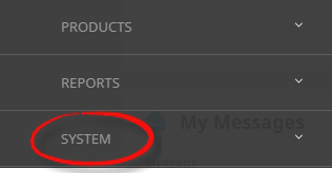
From the Home menu, select
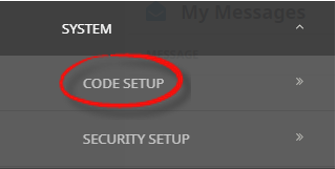
 Home > System > Code Setup.
- Click the Home menu to expand it:

- Click the System menu option to expand it:

- Click Code Setup to go to the Code Setup menu:

- Click the Home menu to expand it:
-
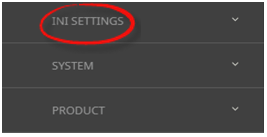
From the Code Setup menu, selectINI Settings > Groups.
- Click the Code Setup menu to expand it:

- Click INI Settings to expand the INI Settings menu:

- Click Groups to open the Groups INI Settings screen:

- Click the Code Setup menu to expand it:
-
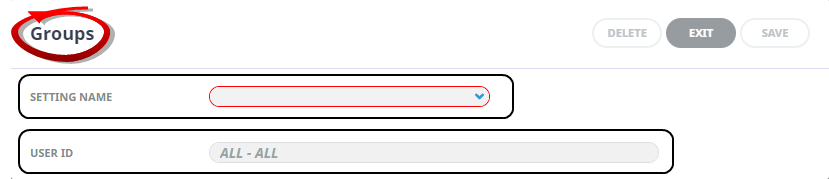
On theGroups screen, if the INI Setting that you want is not already in the list, click Insert.

-
In theGroups screen, select a Setting Name and User ID.
-
ClickSave to keep the changes.

-
ClickExit to discard any changes.



Available Groups INI Settings
INI Settings can be enabled for all users or (where permitted) for specific users.
BKCREDITLIMITPW (All or Per User)
The password used in conjunction with BKCREDITLIMITTYPE (below).
BKCREDITLIMITTYPE (All or Per User)
The value entered against this setting determines system action in the event of an agent’s credit limit being exceeded. The allowable values are: DENY which will not allow the booking to proceed; PASSWORD which will allow the booking to proceed once the password stored in BKCREDITLIMITPW (above) has been entered, WARNING which will warn that the credit limit has been exceeded, and NOLIMIT which will allow the booking to proceed without a warning or passwords requirement.
BKG_CANCEL_STATUS (All or Per User)
The booking status that must be attached to a Booking before it can be deleted. (see Booking Status).
BKG_CANCEL_WITH_PENALTY_STATUS (Per User)
This setting specifies the Booking Status assigned to a booking when it is cancelled and the booking has one or more services that will attract cancellation penalties. If no cancellation penalties are involved, the BKG_CANCEL_STATUS setting is used.
BK_INVOICELINE_MODE (All or Per User)
The radio button default for Service Line order when generating an agent invoice from Groups. Available options are:
-
Service - Invoice line per service
-
Room Type - Invoice line for each Itinerary/Room type with room based values.
-
Person - Invoice line for each Itinerary/Room type with pax based values.
BOOKING_COUNT (All or Per User)
Used in conjunction with the value set in DEFAULT_BOOKING_NAME (below) as a suffix to the default booking name. The number increments automatically.
BOOKINSIDERELEASE (All or Per User)
Setting that allows allocation to display inside the set release period. (Y/N).
CALCULATE_SCU_FOC (All Users)
This setting indicates whether Second Charge Unit FOCs (i.e., Stay/Pay deals) should be used in Groups. (Y/N).
CONSULTANT (Per User)
Used to link the Consultant’s Tourplan login name with the Consultant initials.
COST_SELL_OVERRIDE_SYNC (All Users)
This setting determines if the sell price in a service line cost screen is automatically updated when the cost price is overridden.
The options are:
-
(Y) Yes, always overwrite the sell price when the cost value is overridden. (Default setting)
-
(N) No, do not automatically overwrite the sell price when the cost value is overridden.
DEFAULT_AGENT (Per User)
Setting used to automatically default a specific agent into the Booking header based on the users login name.
DEFAULT_BOOKING_NAME (All Users or Per User)
Can be used to default a standard booking name—e.g., Quote Reference. The value in the BOOKING_COUNT setting (above) can be used to append a numeric value to the default name—e.g. Quote Reference 125.
DEFAULT_BRANCH (All or Per User)
Can be used to automatically default a specific Booking Branch into the Booking header based on the user's login name.
DEFAULT_COMM (All or Per User)
A numeric value indicating the default Agent Commission percentage on a booking. This value is overridden by any commission value attached to the agent record.
DEFAULT_DEPT (All or Per User)
Can be used to automatically default a specific Booking Department into the Booking header based on the user's login name.
DEFAULT_MUP (All or Per User)
A numeric value indicating the default Booking Mark-up percentage. This value is overridden if the agent has a mark-up percentage attached.
DEFAULT_SALE1–6 (6 Fields) (All or Per User)
Can be used to automatically default a specific value into the Booking Analysis fields based on the users login name.
DEFAULT_SUBCODE (All or Per User)
Used to set a default foreign currency conversion sub-code (see Currency Subcode) into the Booking header.
DUPLICATE_NAME (All or Per User)
This setting determines what action will be taken when a duplicate Group booking name is entered. The options are: Yes (allow duplicate names), Warning (warn a duplicate exists then allow), and No (deny duplicate names).
EDITCLOSEDVOUCHER (All or Per User)
The value for this setting determines whether a service can be altered after the service has been (paid and) closed. (Y/N).
NOTE: This setting has an impact on any alterations to services which may be required after services have been paid and closed. If (e.g.) an exchange rate variation requires the booking to be recalculated, and some/all services have been closed, a message will advise that Closed services have not been updated.
EDIT_DATEENTERED (All or Per User)
This setting allows or denies the Booking Date Entered field to be accessed and the date changed. (Y/N).
EDITABLETAX (All or Per User)
When the value for this setting is 'Y' the 'Tax' fields in the service cost screen can be accessed and changed.
GB_DEFAULT_PCM_EDG (All or Per User)
The default setting for the checkbox Use PCM EDG (Escort, Driver, Guide) Values when inserting a PCM into a Group booking. (Y/N).
GB_MODIFY_PCM_NOTES (All or Per User)
When a Package PCM is used to create a series departure master booking, one of the Package set up parameters is whether any PCM Notes should be automatically copied into the Group booking. This setting determines whether those copied in notes are allowed to be edited in the Group booking. (Y/N).
GB_PAXTEXTLABEL1–10 (10 Fields) (All or Per User)
These 10 settings can be used to label the general text fields in the Rooming List, Pax Names screen.
GB_RETAIN_VCH_DEFAULT (All or Per User)
The default setting for the checkbox 'Retain Voucher Text' during Service Substitution. (Y/N)
INSERTPCM_LINKED (All or Per User)
The default setting for the checkbox 'Retain Link to PCM' when inserting a PCM into a Group booking. (Y/N).
INSERTPCM_MERGE (All Users)
When inserting a PCM into a booking, there are two options. One is to insert the PCM at a specific day/sequence which will move any existing booking services following that Day/Sequence to the end of the PCM being inserted. The second is to 'Merge' the PCM being inserted so that the day/sequence numbers of it fit around the day/sequence numbers of the host Booking. This setting enables the default to be set to Merge when set to (Y)es or to Insert when set to (N)o.
NAVIGATION_ON_INSERT (All or Per User)
This sets which screen is displayed after the Insert new booking header screen has been completed. The available options are: Booking Details, Itinerary (Default), or PCM management.
RATERULECHECK (All or Per User)
Check rate rules in batch processes such as insert booking. (Y/N).
RECOST_PCM_LINES (All or Per User)
This will set the default re-cost option when inserting a PCM into an FIT booking. The values available are: No, All (Except Overrides), and Overrides.
STATUS (All or Per User)
The default initial status of the booking. The status code must already exist - see Booking Status
VALIDATE_TRANSACTIONS (Per User)
When this value is set to 'Basic', Tourplan will test for accounting transactions before allowing booking deletion. If transactions are found, deletion is denied.