
Loading interactive content…
Most settings in this section relate to default G.L. Account details which Tourplan uses to post transactions automatically. Why and how these accounts are used is discussed in the Accounts User Manual . This section simply lists the accounts that are available to be set up.
Each account setting has three components
- BR = Account Branch
- DP = Account Department
- AC = Account Number.
The G.L. Account Branch is the required value for the BR component; the G.L. Account Department is the required value for the DP component and the G.L. Account number is the required value for the AC component. The three components are listed as one in this section.
Provided the account number is common, an INI setting can set to post to multiple accounts. An example is Booking Revenue and Booking Expenses. It is quite common for different departments of a user company to have the revenue and expenses broken down by department. e.g., If the company has a single branch (NZ) and multiple departments (FT, GR, IN, SE etc) and a common account for revenue (e.g. 010000), the GL_REVENUE_BR/DP/AC settings could be set up as follows:
GL_REVENUE_BR = NZ
GL_REVENUE_DP = (blank)
GL_REVENUE_AC = 010000
When the revenue postings were being done, Tourplan would recognise the Department value was blank and then get the appropriate Department from the Booking Reference field and post the revenue to that specific department's revenue account. Naturally G.L. Accounts must exist in the G.L. Chart for all possible Branch/Department combinations.
Enable a Financial INI Setting
-
From the Home menu, select
 Home > System > Code Setup.
- Click the Home menu to expand it:

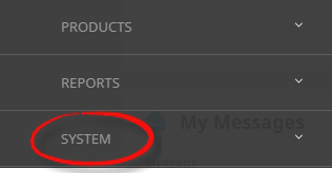
- Click the System menu option to expand it:

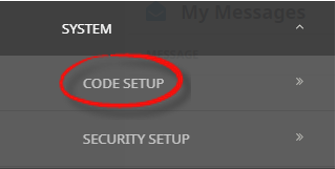
- Click Code Setup to go to the Code Setup menu:

- Click the Home menu to expand it:
-
From the Code Setup menu, selectINI Settings > Financials.
- Click the Code Setup menu to expand it:

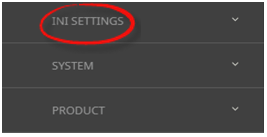
- Click INI Settings to expand the INI Settings menu:

- Click Financials to open the General Ledger INI Settings screen:

- Click the Code Setup menu to expand it:
-
On theGeneral Ledger screen, if the INI Setting that you want is not already in the list, click Insert.

-
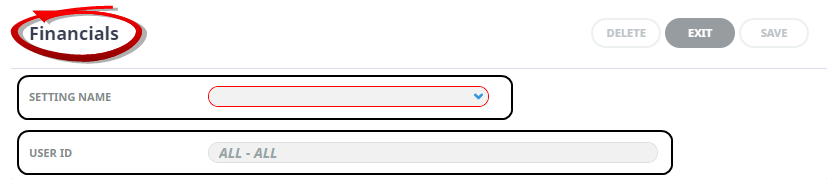
In theFinancials screen, select a Setting Name and User ID.
-
ClickSave to keep the changes.

-
ClickExit to discard any changes.



Available INI Settings
INI Settings can be enabled for all users or (where permitted) for specific users.
GLCLOSEDPERIOD (All Users)
The General ledger closed accounting period.
NOTE: This value is set when the system is installed and should ONLY be altered on the basis of support advice. Altering this setting can result in G.L. Account balances being incorrect.
GLCURRENTPERIOD (All Users)
The General ledger current accounting period.
NOTE: This value is set when the systems is installed and should ONLY be altered on the basis of support advice. Altering this setting can result in G.L. Account balances being incorrect.
GLLOCKEDPERIOD (All Users, Period)
The accounting period that the G.L. is locked for. This value denies the posting of subsidiary ledger (Debtors & Creditors) transactions into a period prior to and including the GLLOCKEDPERIOD. Format is yyyynn.
GLUDLABELn (5 Fields) (All Users)
Used to label the 5 User Defined text fields which then display in the General Ledger > Details Tab.
GL_ARUNALLOCATEDCASH_AC/BR/DP (All Users)
The debtors unallocated cash account detail.
GL_CRBANK_AC/BR/DP (All Users)
The default bank account used for creditor payments.
GL_CRCONTROL_AC/BR/DP (All Users)
The creditors control (Creditors) account detail.
GL_CRFOREXREALISED_AC/BR/DP (All Users)
The account detail for the Creditors Foreign Exchange variations account, after realisation.
GL_CRFOREX_AC/BR/DP (All Users)
The G.L. account detail for the Creditors Foreign Exchange variations account, before realisation.
GL_CRFUTCASH_AC/BR/DP (All Users)
The account detail for the creditors Future Cash account.
GL_DRBANK_AC/BR/DP (All Users)
The default bank account used for debtors receipt postings.
GL_DRCOMMISSION_AC/BR/DP (All Users)
The detail of the account used to post agents commission payments to.
GL_DRCONTROL_AC/BR/DP (All Users)
The debtors control (Debtors) account detail.
GL_DRFOREXREALISED_AC/BR/DP (All Users)
The account detail for the Debtors Foreign Exchange variations account, after realisation.
GL_DRFOREX_AC/BR/DP (All Users)
The account detail for the Debtors Foreign Exchange variations account, before realisation.
GL_DRFUTCASH_AC/BR/DP (All Users)
The account detail for the Debtors Future Cash account.
GL_DRPREPAYMENT_AC/BR/DP (All Users)
This account is only used by the BSP/ARC import process to hold the debit posting for air tickets until the travel period becomes current.
GL_DRTAXONCOMMISSION_AC/BR/DP (All Users)
The detail for an account that will specifically hold Tax on Agents commission.
GL_EXPENSE_AC/BR/DP (All Users)
The detail of the account(s) that booking expenses are posted to.
GL_FUTCOMM_AC/BR/DP (All Users)
The detail of the account used to post agents commission payments to when the revenue is in a Future period.
GL_FUTEXPTAX_AC/BR/DP (All Users)
The account(s) that tax from creditors future expense transactions will post to. Only used when GL_POST_TAX_CURRENT = N.
GL_FUTEXP_AC/BR/DP (All Users)
The account(s) that creditors future expense transactions will post to.
GL_FUTREVTAX_AC/BR/DP (All Users)
The account(s) that tax from debtors future revenue transactions will post to. Only used when GL_POST_TAX_CURRENT = N.
GL_FUTREV_AC/BR/DP (All Users)
The account(s) that debtors future revenue transactions will post to.
GL_NEXT_JOURNAL (All or Per User)
This setting can be used to enter a starting reference number for G.L. Journals. Used in conjunction with GL_NEXT_JOURNAL_PREFIX and GL_NEXT_JOURNAL_SUFFIX.
GL_NEXT_JOURNAL_PREFIX (All or Per User)
A predefined Journal Reference which will precede any value in GL_NEXT_JOURNAL.
GL_NEXT_JOURNAL_SUFFIX (All or Per User)
A predefined Journal Reference which will follow any value in GL_NEXT_JOURNAL.
GL_POST_TAX_CURRENT (All Users)
The option selected in this setting will determine if tax is posted into the: Revenue/Expense posting period (N) or to the Transaction period (Y).
GL_REVENUE_AC/BR/DP (All Users)
The detail of the accounts that bookings revenue is posted to.
GL_SUSPENSE_AC/BR/DP (All Users)
The detail of the account which is used to post transactions to when the requested G.L. Account is not found in the chart.
NOTE: This is an account for the specific use of the system and there can only be one 'System Suspense Account'. It must be separate account, not used for any other purpose.
GL_TAXIN_AC/BR/DP (All Users)
The account(s) that input tax (from creditors transactions) will post to.
GL_TAXOUT_AC/BR/DP (All Users)
The account(s) that output tax (from debtors transactions) will post to.