
Product Markup & Booking Markup Explained
What is the difference between product markup and booking markup?
Markup can be applied within the product database. This is often the simplest method to show the Tourplan term cost and sell. The product markup applied is the difference between the cost and sell price:
Product Rates Screen
There is a Group and FIT cost (these are often the same rate, but there is the option available to support differing rates for Groups and FITs), and there is a markup % or $ value which is added to Groups and FITs Cost rate to provide our Selling rate.
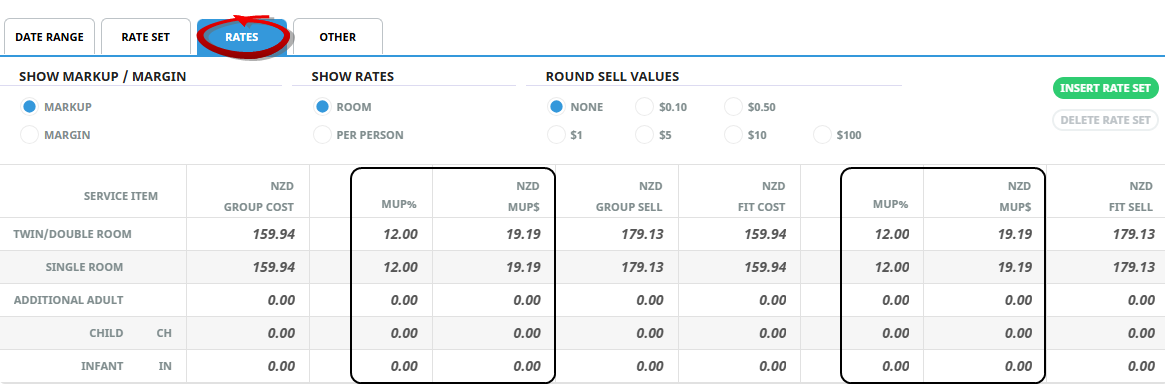
Product markup is an easy and straightforward mechanism, but only offers selling price differentiation between Groups and FITs, not for different Agents, or special types of bookings. It can be used in conjunction with other markups, providing a base markup, over which subsequent markup types can be applied.
FIT Markup/Commission Screen Within Booking
The example rate shown above, when entered into a booking, has a service level markup which is obtained via the difference between the Cost and Sell price. (Taxes are also determined within the product database and applied to provide the sell rate within the booking).
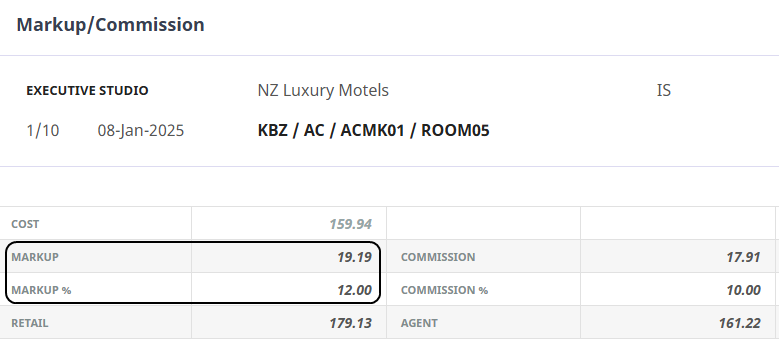
The above example is one method of applying markup on a product-by-product basis. If you have variations of markup which need to be applied to the same product there are alternative solutions. This document will help you to understand the options which are available to you.
A booking markup and commission can also be added to the sell price of the service which is being inserted.