
Booking Analysis & PCM Analysis
Alternative solutions are available when using the DCM matrix rules where Analysis fields can be defined to mark up Booking or PCM quotes. Careful consideration for the setup of analysis fields is required and we suggest and encourage discussion within your organisation as to the intention of these fields. (Simplification is the key to ongoing maintenance).
It is important to note that there are 6 Booking Analysis Fields and 6 PCM Quote Analysis Fields.
Below is a list of examples of how some of our existing Tourplan clients are using their Booking Analysis Fields. (N.B. there are only 6 fields and some of our clients only enable 2-3).
Booking Analysis Heading Examples
-
Booking Type – FIT, GIT, Internet, Fam Trip etc
-
Destination Indicator – NI, SI, Both etc
-
Destination Sub-indicator (e.g. of above)
-
Country of Booking Origin – List of countries
-
Origin, Type & Language – FIT German, FIT English
-
Booking Type (2) – Sports, Cultural, Artistic etc
-
Sales Representative
-
Package Type
-
Booking Source
-
Sales Rep/Consultant
-
Country of Booking Origin
-
Advertising Source (Direct Bookings)
-
Package Name/Type
-
Booking Lead Time – 1 Month+; 14+ Days; 7-13 Days etc
The screen used in the next example is used to attach Booking or PCM Analysis fields to the DCM matrix rule. The Booking Analysis or PCM Analysis fields will need to be assigned within a booking and when the DCM matrix rule is applied the value will be added to the booking total.
However before they can be applied to a booking or DCM matrix rule, they must first have been setup up in Code Setup.
DMC Matrix Rule Example
Both Booking Analysis and PCM Analysis can be applied within the same DCM matrix rule as seen in the example below. A Booking Analysis filter will be applicable when inserting affected service Price Code in either the FITS or GROUPs application; while a PCM analysis filter will be applicable when inserting the same affected service Price Code in the PCM application.
In this example the PCM Analysis Code MI-Mice has been enabled for a 20% markup for the EU Market. If you look to the Date Range field this is an ‘Unrestricted’ Service and Sales period – this will be applied to all PCMs that meet this criteria.
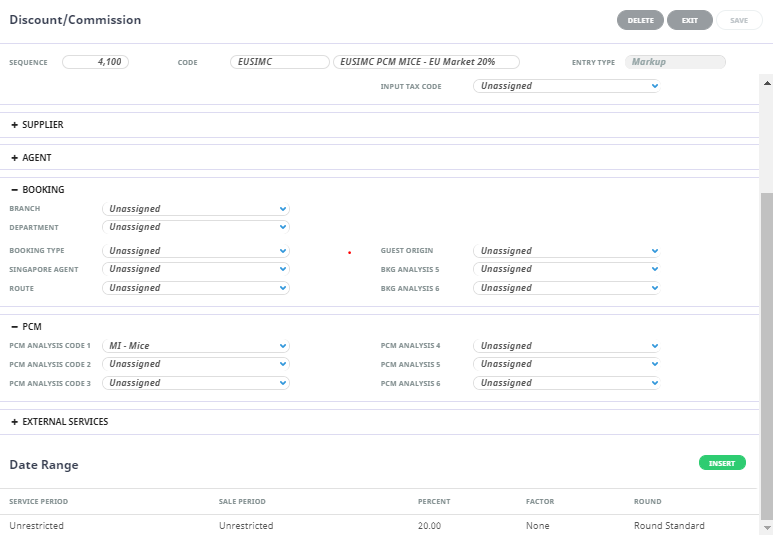
With this setup:
-
The PCM quote analysis is applied to the quotation General Setup Screen/PCM Analysis filed.
-
The PCM Quote Service shows the Sequence Number 4100 has applied the Matrix code EUSIMC to the quotation.
DCM Matrix Drill Down
The matrix details cannot be obtained from within the booking. If the matrix rule is queried, the specific rules attached to this matrix rule entry will need to be obtained from the DCM matrix screen within Code Setup. There is a search function available for looking up specific sequence numbers which is particularly useful if you have a complex list of rules. The DCM matrix is listed numerically by sequence number allowing an alternative manual search method.
Considerations
When inserting a PCM into a booking there is one other factor that could influence your markup within a booking. This will be covered in more detail during the Booking and Quote entry stage of your set up… for now it’s important to understand that there are additional controls when inserting a PCM into the booking: the system will allow users to retain the link which will keep the sell price of the service the same as that in the PCM.