
Agent Commission Or Markup
What strategies are available to cost commission or mark up for agents?
Price Codes are used to automatically apply different levels of product pricing. However before they can be applied to an agent, they must first have been setup in Code Setup. Then, within the Product Database, selling prices per product per season per Price Code will also need to be configured.
Commission %
If a fixed percentage commission is paid to the agent for bookings, enter the percentage value in this field. If commission is not paid to this agent, leave the field as 0.00. If the agent can receive multiple rates of commission then leave the field as 0.00 and set commissions on an individual booking-by-booking basis in the booking applications.
If the commission % is defined within the debtor and amendment to the debtor's commission level is required, individual maintenance of this field will need to occur.
Alternatively leave this field as 0.00. Commission levels can be used from the DCM rule (commission). Agents can be grouped using an analysis code.
-
Do you offer tiers of agents different commission rates? (We suggest using the DCM)
-
Do you offer all agents the same commission rate? (Either set at the agent level or use the DCM)
-
Is there any variation in commission levels that you offer your agents? Are these variations grouped into tiers or are they individually negotiated?
-
How do you plan to maintain your commission levels? Will there be a need to amend commission levels in the future?
Markup %
The standard markup to be applied on all bookings for this agent. If there is not a standard markup for this agent leave as 0.00 and apply markup in the Tourplan Booking applications. If markups have been applied on a product-by-product basis in the Tourplan Product Database or via DCM Matrix, then leave this field as 0.00.
Agent Price Codes Priority Setting
If Price Codes are being used as the main markup method, the order in which the Price Codes are listed is important— this field determines the Price Code that Tourplan is to use (by default) when calculating quotation and booking prices for this agent, and should be at the top of this list. The others will be used by Tourplan when the product to be priced does not have the default Price Code available.
NOTE: The order of the Agent Price Codes can be changed by highlighting the Price Code to be reordered and then clicking the up or down arrows in the centre of the screen.
The following is a sample Agent price codes priority setting.
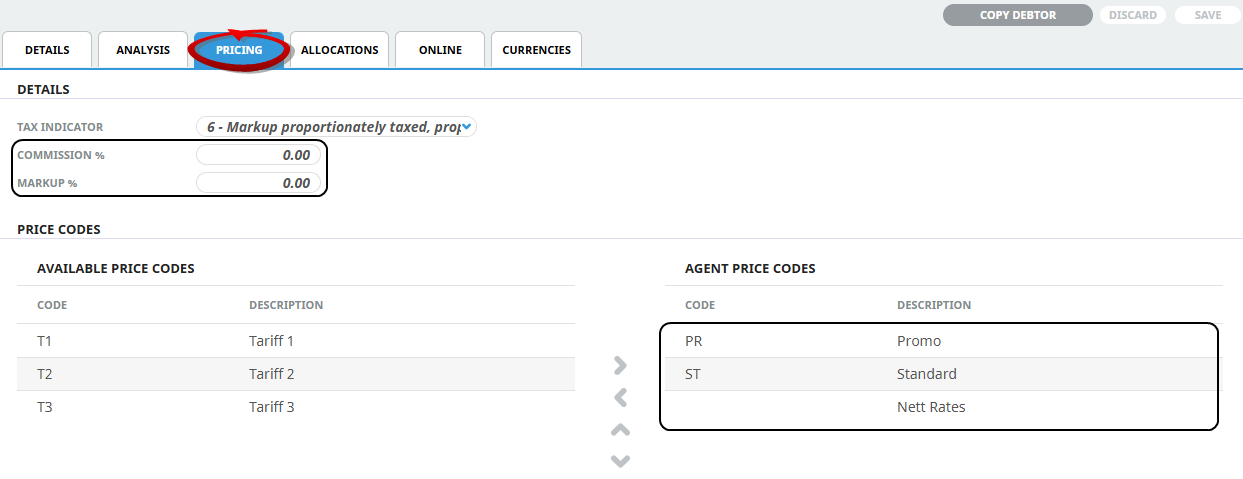
NOTE: Some Agents may have less or more than the sample Price Code setup as per the screen shot above. The number of price codes created and attached will depend on the service cost rates given by the Supplier and the applicable markup given to the specific Agent.
With this example, for this debtor/agent the system will look firstly for price code PR, followed by ST, and then nett rates. If there are no rates present for any of these price codes (PR or ST) the system will apply the nett rates for the service. The commission and markup fields have been left at 0.00.