Sample Price Code Setup
Example 1
Setup Price Code in services within the product database with the cost given by the Supplier along with a markup selling price for your booking Agent.
Depending on the different markup levels (by flat value / by percentage) for selling price, additional price code(s) may be required for the same set of cost rates given by the Supplier.
The following are sample Price Codes rate setup for Europe and Asia Markets based on Supplier Cost rate with different markup levels:
| Price Code | Description | Supplier Costs Rate Example | Agent Selling Rate Example |
|---|---|---|---|
| E1 | Europe Market Tier 1 | THB 3000 | THB 3500 |
| E2 | Europe Market Tier 2 | THB 3000 | THB 3600 |
| E3 | Europe Market Tier 3 | THB 3000 | THB 3700 |
| *EU | Europe Market (Nett) | THB 3000 | THB 3000 |
| A1 | Asia Market Tier 1 | THB 2800 | THB 2900 |
| A2 | Asia Market Tier 2 | THB 2800 | THB 3000 |
| A3 | Asia Market Tier 3 | THB 2800 | THB 3100 |
| *AS | Asia Market (Nett) | THB 2800 | THB 2800 |
*EU and *AS price code for Nett rates – This example setup method is often practiced / used in conjunction with Rate Maintenance function to "Duplicate Rate" and add markup flat value/percentage on top of the Supplier Cost to build A1/A2/A3 etc...
The rates entry requirement is to have the Cost rate and Selling rates both the same, inserting the Supplier Cost rate for both Cost and Sell.
Example 2
Insert Price Codes within the Product Rates with the Cost given by the Supplier, marking up services from the database by using DCM Matrix.
The Discount/Commission/Markup matrix allows either Discount(s), Commission(s) or Markup(s) to be set up, which can then be automatically applied against specific services or bookings, based on a range of user-defined rules.
Each DCM matrix record has a Valid From/Valid To date which means that Discounts, Commissions and Markups can be set for specific periods or seasons.
NOTE: It is easier to change an agent from one DCM Markup level to another than to change the "Price Code".
The following are example Price Codes setup with Nett rates based on Supplier Cost rate. DCM matrix setup will be against the Nett rates price codes:
| Price Code | Description | Supplier Costs Rate Example | Agent Selling Rate Example |
|---|---|---|---|
| EU | Europe Market (Nett) | THB 3000 | THB 3000 |
| AS | Asia Market (Nett) | THB 2800 | THB 3000 |
| AF | Africa Market (Nett) | THB 3100 | THB 3100 |
| AM | America Market (Nett) | THB 2900 | THB 2900 |
| WW | World Wide (Nett) | THB 3100 | THB 3100 |
Example Rate Setup:
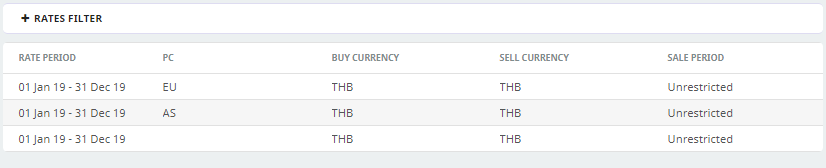
This screen capture shows the different price codes applied per date range. In this example there is an EU Price Code, an AS Price Code and an undefined (World Wide blank Price Code).
Price Code - Cost rate Example:
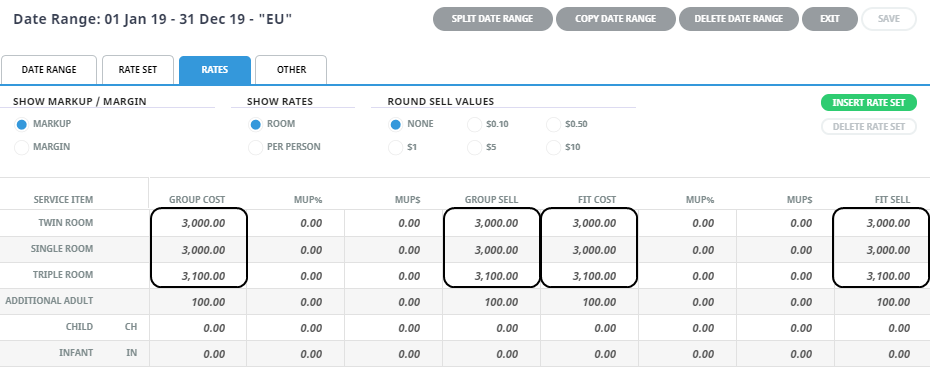
Here we can see the product database is using the Supplier Cost with no markup applied within the Product Database – this is the cost for the EU Price Code.
Currently with this setup there is no markup applied: we will use the DMC matrix to apply the markup for this product.
Discount Commission
DCM Matrix sample setup – apply 10% markup on Accommodation service type for Price Code EU.
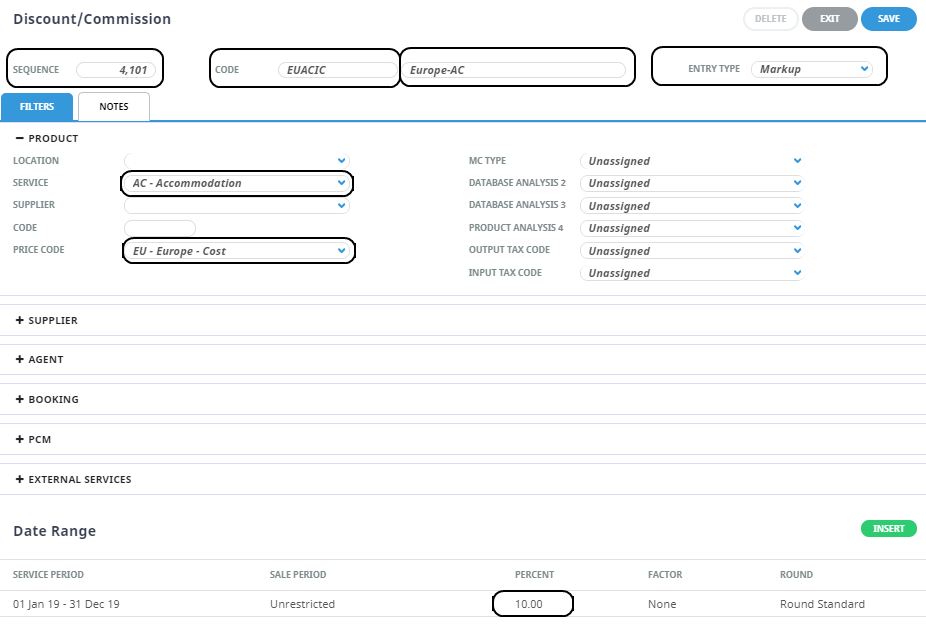
This rule will apply a 10% markup to all Accommodation Service Types for the EU Europe - Cost Market.
DCM Matrix – Markup Rule Applied In Booking:
When the example service above is inserted into a booking the markup is applied to the Cost stored in the Product. Users can see the Markup % applied to the service and can view the Discount Commission rule applied (EUACIC).
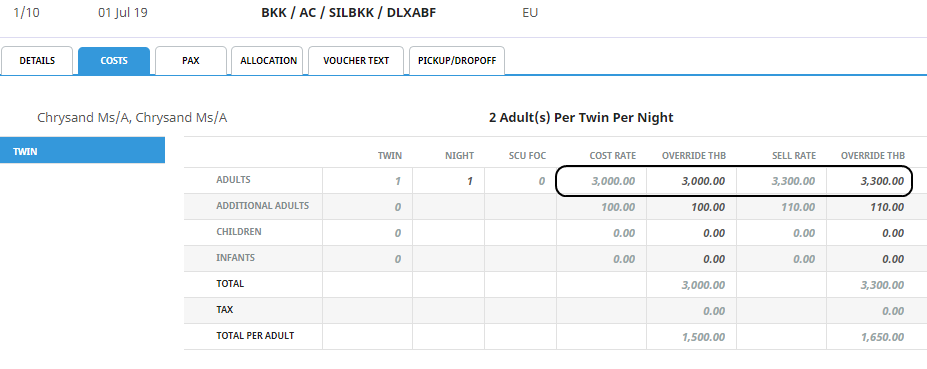
We can see the cost is 3,000 with a 10% markup, to make the Agent amount 3,300.

Service Cost Detail In Booking
When a Tourplan user drills down into the service from within a booking they will be able to view details such as the Service Code and Price Code; the Cost and Sell amounts for the service; as well as the total amount for the service.
(The user can also see the per-person (adult) price for this service).